Translating the sample report
weewx-loopdata manual · weewx-loopdata on GitHub · Report an issue
As of 6.4 the sample report is translatable, entirely through WeeWX’s own mechanisms — lang files, [Texts]/$gettext, and the [Almanac] section. There are no invented conventions to learn: if you have translated a WeeWX skin before, this works the same way. (Language support needs WeeWX 4.6 or later.)
Eight complete translations ship with the skin, in skins/LoopData/lang/. Every one covers the whole report; Beta means it has not yet been read by a native speaker, not that it is partial — corrections are welcome either way.
| Language | File | Status |
|---|---|---|
| Danish | lang/da.conf | Reviewed — contributed by native speaker Gert Andersen |
| German | lang/de.conf | Beta — its shared vocabulary is reviewed, this skin’s own strings are not |
| French | lang/fr.conf | Beta — its shared vocabulary is reviewed, this skin’s own strings are not |
| Spanish | lang/es.conf | Beta |
| Italian | lang/it.conf | Beta |
| Dutch | lang/nl.conf | Beta |
| Norwegian (Bokmål) | lang/no.conf | Beta |
| Swedish | lang/sv.conf | Beta |
A ninth file, lang/en.conf, is the English reference dictionary rather than a translation — it is what you copy to start a new language. The vocabulary these files share with weewx-skyfield and weewx-celestial is copied verbatim from theirs, and a test keeps the three extensions in step.
Select one in weewx.conf:
[StdReport]
    [[LoopDataReport]]
        lang = da
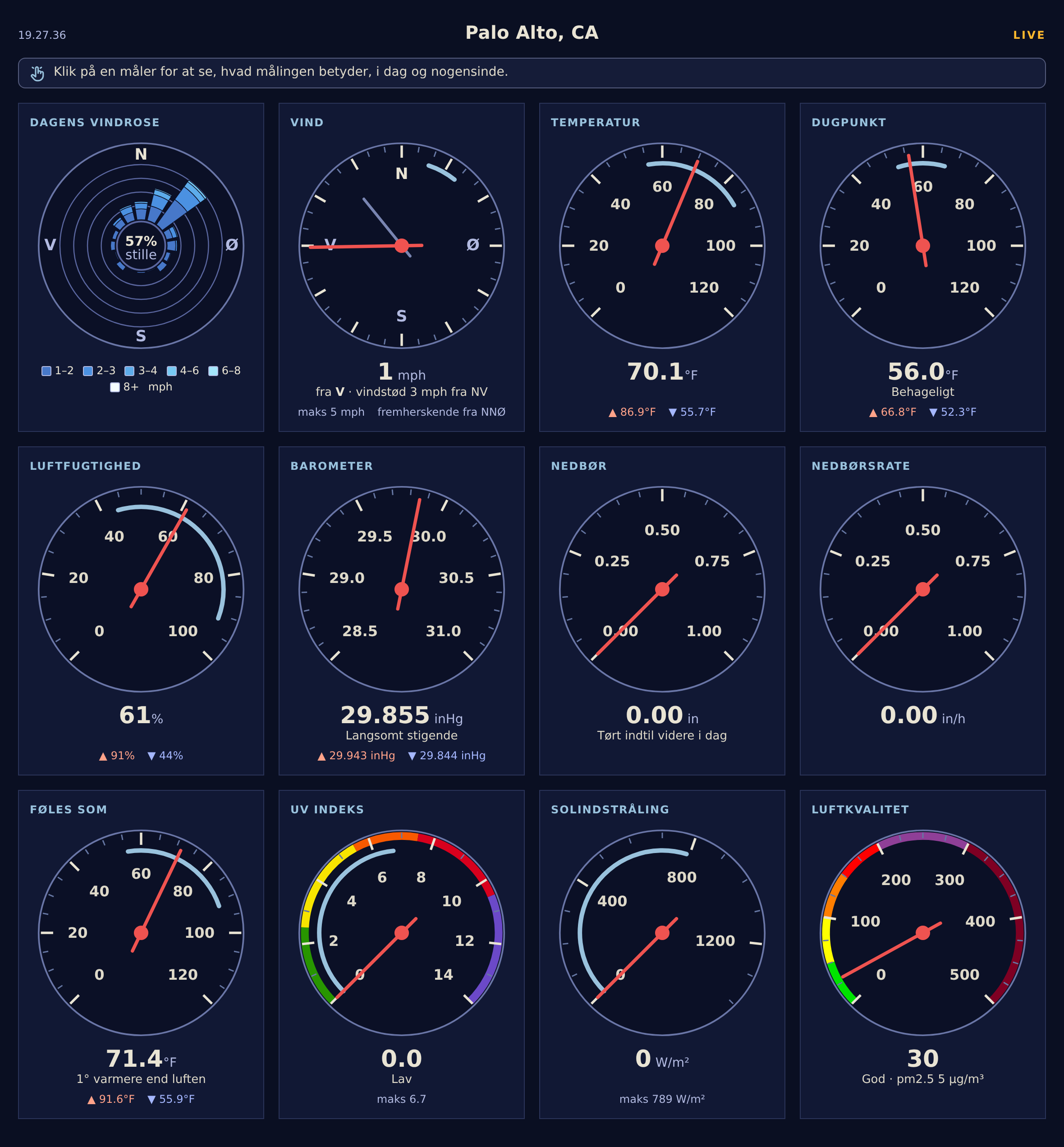
The sample report in Danish — gauge headings, readouts, the LIVE badge and the compass letters all come from lang/da.conf:
Two languages meet on the page
This is the one thing unique to a loopdata page, so it comes first: a loopdata page mixes two sources — its own labels, and live values that another process wrote — and their language settings are coupled through the report that declared the fields. For the sample report, which declares its own, that is one setting; the two come apart only for a page reading fields declared elsewhere.
- The page’s own labels — the gauge headings, the LIVE badge, the readout lines under the dials — follow the sample report’s
lang, via its lang files, as on any WeeWX skin. - The live values in
loop-data.txtfollow the language of the report that declared them: loopdata renders each report’s fields with that report’s formatter and texts, so.ordinal_compassfields take the report’s compass ordinates,moon_phaseitsmoon_phases, andalmanac.<body>.label/almanac.<body>.constellation.labelits[Almanac]names. (Fields on the old station-wide[[Include]]line followtarget_report’s language instead.)
For a report that declares its own fields — the sample report does — the two are one report, so lang = de on [[LoopDataReport]] switches labels and values together; the shipped lang files carry the value-side sections (compass ordinates, moon phases, body and all 88 constellation names, hemisphere letters) so a German report serves German values. Two reports on one skin in two languages each get their own entry in the file, in their own language.
A page still reading the old flat keys follows target_report’s language, so a coherent German page there needs both: lang = de on the page’s own stanza and a German target report. The simplest route sets every report at once:
[StdReport]
    [[Defaults]]
        lang = de
A skin with no German lang file simply stays English — a missing language is a logged no-op, never an error.
trend.barometer.desc follows the same rule: each English description (Falling Slowly, Steady, …) is a gettext-style key into the declaring report’s [Texts] (target_report’s, for the old fields line), the shipped lang files carry all nine, and a missing key falls back to the English. (Before 6.4 these came from a [LoopData] [[BarometerTrendDescriptions]] section in weewx.conf; that section is gone and now ignored — delete it, and put any custom wording in the report’s [[[Texts]]] instead.)
Month names and decimal points
Two things come from the machine’s locale rather than from a lang file: the month and weekday names inside a rendered time — 21. Juni, samedi — and the decimal point in a formatted number, 12,3 rather than 12.3. WeeWX takes the locale from a report’s lang setting, and since loopdata 7.4 loopdata reads the same setting, per report, so a value in loop-data.txt reads the way that field reads on the report’s own pages.
There is a catch here, and it is WeeWX’s rather than loopdata’s: lang is handed straight to the operating system as a locale name, and de is not one. Linux knows de_DE.UTF-8; it does not know de. So lang = de gives a thoroughly German page — every label and phrase, out of de.conf — with English month names and a period for a decimal point, on the report’s own pages and in loop-data.txt alike. Nothing is out of step; those two things are simply not translated.
To get them as well, name a locale the machine actually has:
[StdReport]
    [[Defaults]]
        lang = de_DE.utf8
The lang file is found either way — WeeWX strips the encoding and the country code before looking, so de_DE.utf8 still reads the shipped de.conf — so on the loopdata side this is a one-word change with nothing to install. The locale itself does have to exist on the machine: locale -a lists what is there, and on Debian and Raspberry Pi OS sudo dpkg-reconfigure locales adds one. A lang the machine does not know is not an error — WeeWX quietly uses whatever locale weewxd itself is running under, which is the lang = de case above.
How it works
Every string the page renders is a gettext-style [Texts] key: the English string is the key. A report falls back to English one string at a time, so a partial translation is fine — a missing key never blanks a gauge, it just renders in English.
The live javascript composes strings too (the badge, the readout lines, the cardinal letters on the wind dial and windrose). Those are translated at generation time and fed to the script as globals through json.dumps, so translations need nothing beyond the lang file — there are no strings to edit in the javascript.
Adding a language
The reference dictionary is skins/LoopData/lang/en.conf — every string the page renders, and nothing else (a test keeps it exact in both directions). To add a language:
- Copy
en.confto<code>.confin the samelangdirectory (e.g.fr.conf) and translate the values — the keys stay English. Translate as much or as little as you like; anything you drop falls back to English per string. - Point the report at it in
weewx.conf:
[StdReport]
    [[LoopDataReport]]
        lang = fr
Composed strings keep their {named} placeholders — reorder them freely, but do not rename them (a broken placeholder makes that one string fall back to English). For example:
[Texts]
    "gusting {gust} from {dir}" = "Böen {gust} aus {dir}"
Note that weectl extension install overwrites skins/LoopData/ — including its lang files — on every upgrade. A new language is durable as a pull request (welcome — a lang file is a self-contained, no-code contribution), or keep your own copy elsewhere and re-copy it after upgrades; local overrides of shipped strings survive upgrades as [[[Texts]]] entries on the report’s stanza in weewx.conf.