Configuration
weewx-celestial manual · weewx-celestial on GitHub · Report an issue
Installing registers the report; its options live in weewx.conf. This is what a fresh install writes — see what an existing station sees below, which is different:
[StdReport]
    [[CelestialReport]]
        #lang = en
        #theme = dark
        HTML_ROOT = celestial
        enable = true
        skin = Celestial
        [[[LoopData]]]
            [[[[fields]]]]
                satellites = almanac.iss.az, almanac.iss.alt, ...
                comets = almanac.halley.az, almanac.halley.alt, ...
        [[[Extras]]]
            loop_data_file = ../loopdata/loop-data.txt
            #refresh_rate = 2
            #expiration_time = 24
            page_update_pwd = foobar
An option that merely selects a default is written commented out, with the default shown. Nothing is lost: with the line commented, the value in force is the one in skins/Celestial/skin.conf, which every upgrade replaces — so if a later release picks a better default, your station follows it. Uncomment one to pin your station to a value of your own. loop_data_file and page_update_pwd are live because neither is a default: the first is derived for your station at install, the second is a placeholder you are meant to replace.
loop_data_file: where the javascript fetches loop data; relative paths are relative to this report’s HTML_ROOT. You should not have to set this: the installer reads your[LoopData]settings, works out where weewx-loopdata actually writes, and puts that here — the value above is what a stock weewx-loopdata gives you, its own report’s directory. An existing setting is never rewritten, only flagged when it disagrees. The file must be reachable through your web server — if weewx-loopdata writes outside the web root (say/dev/shm) with no alias serving it, the installer cannot know the URL that reaches it and says so, and the page’s badge will tell you the same:NO DATA (HTTP 404) — check loop_data_file.refresh_rate: seconds between loop-data polls (match weewx-loopdata’s write cadence: 2 for the Vantage driver). Ships commented out. The countdown chips and the satellite rosters advance with each packet a poll brings, since the page’s clock is the packet’s own.expiration_time: hours the page keeps polling before requiring a click. Ships commented out. An unattended browser therefore stops polling overnight instead of for ever; the badge readsCLICK-MEand a click resumes it.0means never expire, which is for a page in another skin that runs an expiry of its own — see Panels in your own skin.page_update_pwd: appending?pageUpdate=<page_update_pwd>to the URL disables expiration for that view. The password is visible to anyone reading the page source, so treat it as a convenience, not a secret.lang: the page’s language — see Translations.theme: the page’s plate —dark(the default),light, orauto. See Dark, light and auto below.title/meta_title(Extras): override the page heading and the HTML<title>.[[[LoopData]]] [[[[fields]]]]: the satellite and comet fields the page reads, declared to weewx-loopdata — written by the installer for your[Skyfield]sets, rebuilt on every install, not for editing. See the declared fields below.
Upgrading an existing station
Nothing you have set is rewritten: WeeWX fills in only what is absent from weewx.conf. So your stanza will not come to look like the one above — a station installed before this release keeps refresh_rate and expiration_time live and has no lang or theme lines, which is fine; copy from above if you want them.
A station upgrading from before this release may still carry a time_zone line. That option is gone — every time on the page is now the station’s own zone, detected at report time — and the line is ignored. weewxd logs a warning naming it, on every report cycle, until you delete it. If you had set browser, the page no longer follows the viewer’s zone.
Where the loop-data file should live
Where the file lands is weewx-loopdata’s decision — its loop_data_dir, relative to its sample report — and this page simply follows: whatever loop_data_file you set has to be the URL that reaches it. The installer works that out for you whenever both sit inside your reports tree, which is the arrangement weewx-loopdata ships with and where most stations leave it.
If you are comfortable editing your web server’s configuration, there is a tidier place for the file — a memory filesystem outside the web root, which keeps it out of your report sync and off an SD card. That is weewx-loopdata’s ground, and its manual has the recipe: Where the loop-data file should live.
Two things to know on this side if you take it. loop_data_file becomes an absolute URL — the one your alias serves — because the file no longer shares a tree with the page:
[StdReport]
    [[CelestialReport]]
        [[[Extras]]]
            loop_data_file = /loop-data/loop-data.txt
And the installer cannot work that one out: a path on disk does not say what URL reaches it, and only your web server knows about the alias. It reports what it found and leaves your setting alone.
Report timing is not supported
Do not set report_timing on this report. This page is live: its dome backdrops are written by the report cycle and stepped through by the open page as its station’s clock advances, and the whole design assumes those two run at the same rate. A report throttled to run less often than the archive interval leaves the page holding a sky older than it is willing to draw marks over, so the dome freezes and says so — permanently, and correctly: from the browser, a deliberately slow report and a station that has stopped writing backdrops look exactly alike.
If report generation is costing more than you want to spend — this skin renders a dome backdrop for each slot that fits inside the archive interval, five of them at WeeWX’s default five minutes and up to ten on a longer one, which is the expensive part — lengthen the archive interval instead. The page follows that on its own: the fragment set is spaced across it, and the staleness limit is derived from it.
Dark, light and auto
The page ships as the night plate it has always been. theme switches it. Add it to the [[CelestialReport]] stanza above, beside skin = Celestial — at the report level, not inside [[[Extras]]], exactly where lang goes:
theme = light
dark— the night page. The default; upgrading changes nothing.light— the paper-atlas page.auto— light while the sun is up at generation time, dark otherwise. The report regenerates each archive cycle, so the flip follows sunrise and sunset to within one interval.
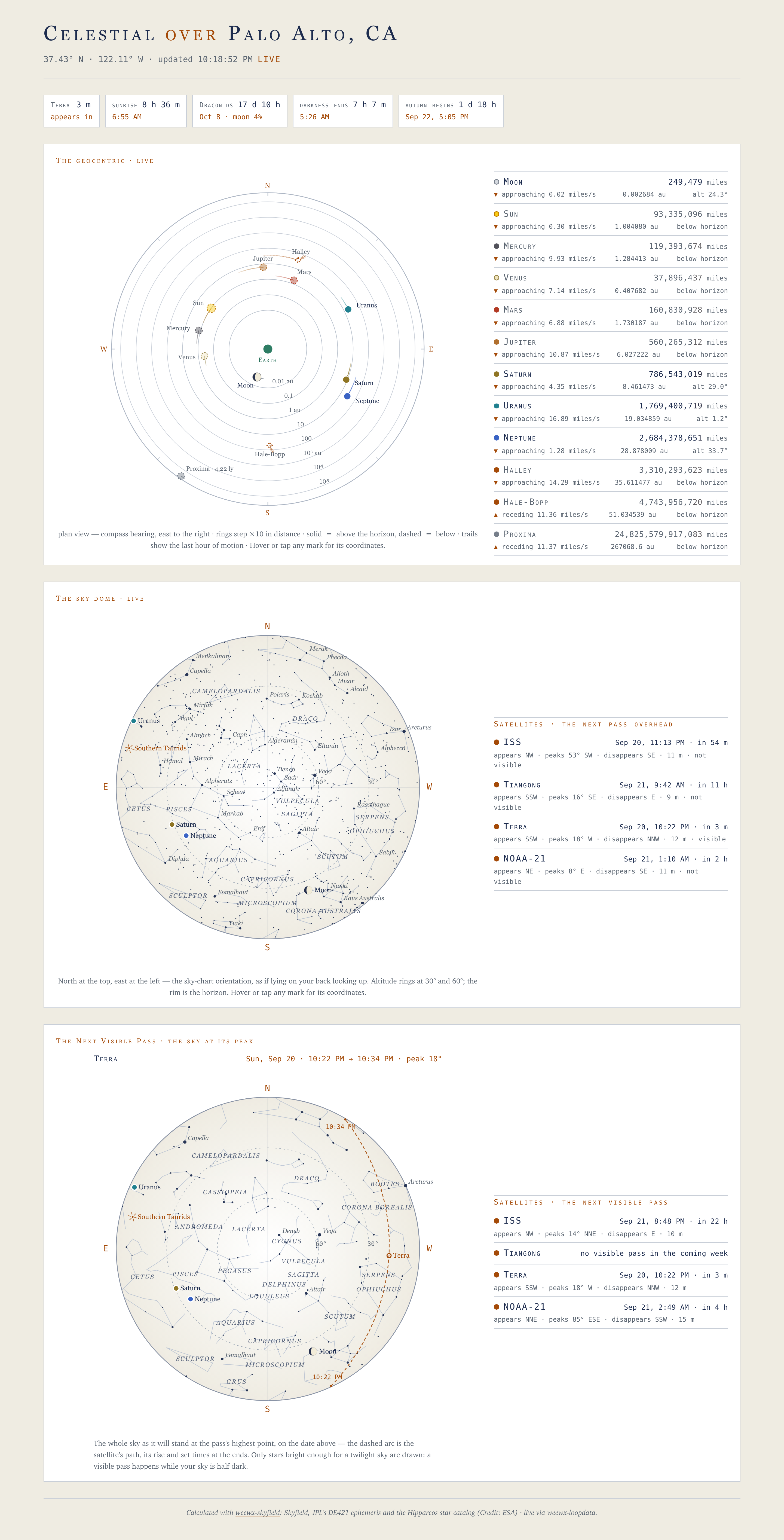
The whole page follows it. The sky dome and the Next Visible Pass chart are weewx-skyfield’s drawings, and on a light page they are rendered on that extension’s matching paper palette — never left as a night rectangle inside a light page. The page above is the same page as the dark one on the home page, one option apart. Everything the page draws itself (the Geocentric dial, the roster, the countdown chips) is on the same paper, with the three pale bodies — the sun, the moon and Venus — taking a darker edge in their own color so they still read against it.
The option is spelled and valued exactly as weewx-skyfield’s own Sky page spells it, so the two pages configure alike; weewx-skyfield reads it straight out of this report’s configuration. Without that extension the page has no charts to match and stays dark.
It is resolved when the report is generated, not in the browser. The dome and the pass chart arrive as SVG with their colors already inside them, and the page refetches them as it runs — so there is nothing for a browser-side toggle to switch, and the page does not follow your operating system’s dark-mode setting. A theme change takes effect on the next report cycle.
The sky dome, the satellites and the Next Visible Pass panel
The dome and the Next Visible Pass chart are drawn by weewx-skyfield and embedded through a guarded search list, so a lesser almanac costs panels, never the page. There is nothing to configure in this skin for them; what they show follows weewx-skyfield’s own configuration:
- The satellite set is
[Skyfield] [[Satellites]]inweewx.conf(weewx-skyfield’s installer defaults to the ISS and Tiangong). The skin enumerates whatever is configured; each satellite needs its nineteen declared fields (see Fields reference) to go live, which the installer writes for the set it finds, and a display name is best set under[StdReport] [[Defaults]] [[[Almanac]]]so every report calls it the same thing. The bundled--add-satelliteutility makes all three edits in one command. - The backdrop steps once a minute. Each report cycle renders a staggered set of dome backdrops (
dome-svg.txt,dome-svg-1..9.txt), spacedmax(60 s, interval/10)across the archive interval, and the open page fetches the one covering the current minute — and only when that is not the backdrop it already has, so a page in step with its station fetches nothing. The fragments describe their own spacing, so any archive interval works unconfigured; if report cycles stall, the page keeps the freshest backdrop it has — and once it is three cycles behind, freezes the dome and says so rather than flying live marks over a motionless star field (see The star field is frozen). The Next Visible Pass chart refetches every five minutes and rolls over to the next pass by itself. - The satellite marker is honest about visibility: drawn whenever the satellite is up, full brightness only when you could actually see it (sunlit satellite against a dark sky), dimmed otherwise.
- The comet set (8.1, weewx-skyfield 2.1) is
[Skyfield] [[Comets]](installer defaults: Halley and Hale-Bopp). Each configured comet gets a diamond on the Geocentric dial — placed like a planet, its tail fanning anti-sunward, solid when naked-eye bright — a roster row, and a windowed perihelion countdown chip; each needs its six declared fields to go live, which the installer writes for the set it finds. The bundled--add-cometutility makes the three edits in one command. The dome and the pass chart draw their own comet diamonds and meteor shower radiants inside weewx-skyfield’s fragments — nothing to configure here.
The countdown row
The chip row at the top of the page has no options of its own: the always-on chips (the soonest visible pass, sunset/sunrise, the meteor shower peak, and astronomical darkness — begins at the −18° sunset, ends at the −18° sunrise, whichever is next) follow the declaration, and the windowed guests (the next equinox or solstice — named by the season it begins — Earth’s perihelion or aphelion, the next supermoon, the next eclipse visible from the station, each configured comet’s perihelion) appear only within ~30 days of their event — close enough for a countdown to mean something. A countdown shows the two largest units that matter: 22 d 19 h a day or more out, with the event’s date beside it; 9 h 35 m inside a day; 35 m inside an hour; 45 s in the last minute. It counts on every loop packet. Every chip is client-side arithmetic on an event instant weewx-loopdata computes once and caches until it passes; a chip whose field the almanac cannot serve simply stays hidden. (weewx-skyfield’s own Sky page shows a perihelion as a dated chip up to a year out; the 30-day window here is deliberate.)
Adding and removing satellites and comets
Each satellite or comet takes three separate weewx.conf edits — its [Skyfield] entry, its declared fields, and its display name — and the extension bundles --add-satellite/--add-comet to make all three in one command (with --remove-satellite/--remove-comet as exact inverses). That is its own page: Satellites and comets.
The almanac tiers
The rosters first-paint at report time from $almanac and then go live from loop data. What renders depends on the almanac WeeWX has:
| Almanac | The page |
|---|---|
| weewx-skyfield 2.7 (satellites and comets configured) | Everything — Proxima Centauri, the sky dome, the satellite layer, the Next Visible Pass chart, the comet diamonds and the full countdown row; the footer carries the full Skyfield/DE421/Hipparcos credit |
| weewx-skyfield 2.7, with neither satellites nor comets configured | The same page without the satellite layer, the Next Visible Pass chart or the comet diamonds: those follow [Skyfield] [[Satellites]] and [[Comets]], which are weewx-skyfield’s own settings, not this skin’s. The dome, the rosters’ honest rows and the rest of the countdown row are all there |
| PyEphem | The Geocentric minus the Proxima Centauri row (PyEphem’s star catalog lacks it), the sunset and darkness chips; no dome or chart — the dome panel shows an install hint |
| built-in | The page generates, but the panels show install hints — the built-in almanac serves none of the positions or distances the Celestial page runs on |
Older than 2.7 is not a tier. 9.6 is pinned to weewx-skyfield 2.7 and the installer refuses an older one, naming the version it found: the sky dome and the Next Visible Pass chart are drawn for a phone as well as a desk and the phone drawing is 2.7’s, the sky charts’ dates and clock times read [Texts] keys 2.6.1 renamed, the panels’ colors are 2.6’s contrast palette, a fragment set’s narrow label layer is drawn by 2.5, the light plate’s brass is 2.4’s value, and the Next Visible Pass chart’s sunlit dot flips by exchanging the role classes 2.4 introduced. Having no weewx-skyfield at all is not a refusal — that is the PyEphem or built-in row above.
The plate follows the same shape. theme is read by weewx-skyfield, and the light plate is the paper its charts are drawn on: on the PyEphem and built-in tiers, where there are no charts at all, the page stays dark whatever the option says.
The footer credit is generated truthfully for whichever almanac actually serves the page.
The declared fields
The page declares the loop-data fields it reads to weewx-loopdata (7.0 or later), which evaluates them on every loop packet and writes them into loop-data.txt under the report’s name — CelestialReport — in this report’s own units, formats and [Almanac] names. The declaration is in two places, and neither wants editing:
- the fields that never change, in the skin’s own
skin.conf([LoopData] [[fields]]), and - the satellite and comet fields, which follow your
[Skyfield]sets, in thesatellitesandcometsgroups of the report’s stanza above — written by the installer and by--add-satellite/--add-comet, and rebuilt whenever either runs.
A field of your own — for a page of your own reading this report’s entry, say — goes in a group of your own in that stanza; weewx-loopdata merges the groups by name, so the skin’s and the installer’s are left alone. The stanza is the report’s, though: weectl extension uninstall celestial removes it whole, your groups with it, exactly as it removes [[[Extras]]] — so keep a copy of any group of your own if you uninstall (the 6.x upgrade path does). It removes only [[CelestialReport]]: a second report of your own running the Celestial skin keeps its satellites and comets groups after an uninstall, and weewx-loopdata goes on evaluating those fields every loop packet for a page that is no longer there — delete that report’s [[[LoopData]]] section by hand. (A report of another skin embedding the panels is different: uninstall that skin and its groups are taken away by the next install or utility run, because the skin’s skin.conf — where its celestial_panels lives — has gone with it. See Panels in another skin below.) The older [LoopData] [[Include]] fields line is not this page’s business: since 8.5 the installer never writes it — it only reads it to count the entries this page now declares itself, which weewx-loopdata evaluates twice per packet while the line stands — and weewx-loopdata retires it in a later release. If your own pages still read it (as, for example, PaloAltoWeather.com’s do), that is between them and weewx-loopdata’s Declaring fields page.
Every entry the skin reads, grouped by what it feeds, plus both halves of the declaration as shipped, is in the Fields reference.
Panels in another skin
Since 9.0 the page’s panels can be embedded in a skin of your own — the countdown row, the Geocentric, the sky dome and the Next Visible Pass chart, live layer and all. The whole recipe is Panels in your own skin; two pieces of it are configuration and belong here.
celestial_panels names the panels a page embeds — any of countdown, geocentric, dome and pass — and belongs in the consuming skin’s own skin.conf, at the top level:
celestial_panels = dome, pass
That is where a well-behaved skin puts it: which panels a page embeds is a property of its templates, the same on every station, so declaring it with the skin means installing that skin needs no edit to weewx.conf on any machine. Every report running that skin inherits it, which is what a second report — a metric twin, say — wants.
A report’s own stanza still overrides it, in the order WeeWX merges in, for a station that needs one report to differ:
[StdReport]
    [[MyReport]]
        HTML_ROOT = public_html/mysite
        skin = MySkin
        celestial_panels = dome
Set in both places, the run logs which file answered, and warns when the two disagree — the stanza wins, and a stale one is easy to forget.
weectl extension install and the --add-satellite/--add-comet utilities then maintain that report’s satellites and comets groups exactly as they maintain the Celestial report’s, and give it only the groups its named panels read: satellites for the dome and the Next Visible Pass, comets for the Geocentric, both for the countdown row. Do re-run the installer after adding the key, and restart weewxd so weewx-loopdata reads the declaration.
Three things about it are worth knowing before you write it. On any report carrying the key, the two group names are this extension’s, so a declared field of your own belongs under a name of your own. The key belongs on a report and nowhere else: under [[Defaults]], or at [StdReport]’s top level, WeeWX would merge it into every report, so both are refused — named once, as the station’s own misconfiguration, in the installer’s output and on the page of any other skin’s report that carries no key of its own. And a name that is not a panel costs that report its declaration and nobody else’s, every run. A page whose panels are not declared, or whose declaration is out of date, says so where the panel renders and in the weewxd log.
[CelestialFragments] goes in the consumer skin’s skin.conf, and declares the dome backdrop sets the report writes — one subsection per set. It is needed only for the sky dome and the Next Visible Pass chart, and only when the default single set is not what the skin wants: two label scales for two screen sizes, a night dome inside a light site, or the files kept in a subdirectory:
[CelestialFragments]
    [[astro]]
        directory = astro
    [[smartphone]]
        prefix = dome-svg-sp
        label_scale = 2.2
        directory = astro
| Key | What it does |
|---|---|
prefix | The set’s file names: <prefix>.txt, <prefix>-1..9.txt, <prefix>-pass.txt. Default dome-svg, whose pass fragment keeps the name pass-chart.txt. One set per prefix, whatever their directories; two sets that would write the same file are refused separately, judged by what kind says each writes |
label_scale | The chart labels’ scale, passed to weewx-skyfield; default 1.2, which is what puts the smallest label at 11px on a chart rendered at its 640px cap |
theme | dark, light or auto, spelled exactly as the report option is; default the report’s own |
directory | Where under the report’s HTML_ROOT the set is written; default HTML_ROOT itself. A plain relative path — nothing that could leave HTML_ROOT |
kind | Which fragments the set is for — dome, pass or both (the default). A skin showing the dome on one page and the chart on another, at different label scales, declares a set for each; without this each would write the other’s files every cycle for a page that never fetches them |
narrow_label_scale | A second label scale inside the desk drawing (9.3): its labels are laid out again at this scale, and a media rule in the chart’s own style picks which layout shows. Since 9.6 this no longer reaches a phone — below the set’s frame threshold the desk drawing is hidden entirely and the phone drawing shows instead — so it is useful only for widths above that threshold. Both this and narrow_media, or neither; positive, and not the set’s label_scale (which now defaults to 1.2, so a narrow layer of 1.2 is refused) |
narrow_media | The CSS media query that selects the narrow layout — "(max-width: 600px)", quoted, or an unquoted comma splits it into a list. It is written into the chart’s own style block, so it may contain only letters, digits, spaces and : ( ) , . -, with its parentheses balanced; anything else is refused when the section is read, naming the set |
The page names the set it embeds in the call ($celestial.dome_html($almanac, set='astro')), so scale, plate, file names and directory all follow from the one declaration. The bundled Celestial skin declares no section at all: one set, dome-svg, at the default scale on the report’s own plate, in HTML_ROOT.
Two drawings, and the width that chooses between them
Since 9.6 every fragment a set writes carries the chart twice — once in weewx-skyfield’s desk frame and once in its phone frame, which is a different drawing rather than the same one with larger words. You do not ask for this and cannot turn it off; a skin that serves phones from the same page as desktops gets it for free.
Which one shows is decided by how wide the chart itself renders, not by the viewport, and the width it changes at is derived from the set’s own label_scale: a chart’s smallest label is 10 units times that scale in a 680-unit frame, so it reaches the 11px floor at 935px of glass on a set scaled 0.8, at 623px on the default 1.2, and at 534px on one scaled 1.4. Each fragment carries its own figure, so setting a label_scale gets you the right switching width without computing one.
A narrow label layer is a different and older thing — a second label layout inside the desk drawing — and it is now useful only for widths above that threshold, where the desk drawing is still what shows:
[CelestialFragments]
    [[stars]]
        narrow_label_scale = 2.2
        narrow_media = "(max-width: 900px)"
Note what is not here: a label_scale. The set takes the default, so its threshold is 623px and the 900px query sits above it. Declaring label_scale = 0.8 would move the threshold to 935px, and the layer would never show — below 935px this drawing is hidden and the phone one is shown instead.
The scale reaches only the text: the star dots, markers and rings are drawn once, the same at every scale.