Using the Sky panels in your own skin
weewx-skyfield manual · weewx-skyfield on GitHub · Report an issue
Every panel on The Sky page is rendered by $sky_page — a standard WeeWX search-list extension, user.wxskyfield_sky, installed along with this extension — and can be dropped into any skin’s Cheetah template. Three things to arrange — four if your skin is not in English:
-
Add the search list to your skin’s
skin.conf(if the skin already setssearch_list_extensions, appenduser.wxskyfield_sky.SkyfieldSkyto that list):[CheetahGenerator] search_list_extensions = user.wxskyfield_sky.SkyfieldSky -
Have the Skyfield almanac registered — this extension installed, with
enable = true(the default) in theSkyfieldsection ofweewx.conf. The panels compute everything from the same public$almanactags available to any template; the dome’s stars additionally come from the registered almanac’s star catalog. -
Bring the CSS along. Text styling and block layout come from CSS classes in the bundled skin’s stylesheet,
skins/Skyfield/sky.css—mono,cardinal,gridlaband friends for the SVG labels;count, thechipfamily and the table rules for the HTML blocks. Copy the rules you need (or the whole file) into your skin’s stylesheet. If you copied individual rules, re-check on each upgrade: a release that adds marks to a panel can add a class (1.10 addedmoonlab, the sun-path moon-time labels; 2.0 addedsatlab, the satellite name label, and the pass chart’spasshead/passname/passwhenhead-line rules), and text with no rule renders at the 16px SVG default in the wrong color — changes.md calls out new classes. 2.4 added two:bandlab, for the labels that sit on the twilight bands rather than on the panel, and a.dotrule that paints the chip and table swatches from the custom property the markup now carries — without that one the swatches have no color at all. 2.2 added one more,skylab, the sky charts’ 30°/60° ring-degree labels.Those labels carry
class="mono gridlab skylab":skylabis the hook for text drawn on the dome gradient rather than on the panel. The bundled stylesheet gives it the same color asgridlab, since every text color there clears its contrast bars on both surfaces, so a skin without askylabrule loses nothing. If you add one to style dome text apart, two things matter:skylabandgridlabare equal specificity and both match the element, so theskylabrule must come after yourgridlabrule; and if yourgridlabrule is scoped (.night .gridlab), scopeskylabthe same way or it will lose. Whatever color you give it must still read against the lighter rim of the dome, not just the panel.The panels’ tooltips are native SVG
<title>elements, so they work on hover with no help — but hover does not exist on a touch screen. The bundled skin shipsskins/Skyfield/sky.js, a small dependency-free script that shows the same tooltip text on tap; copy it (and the.skytiprule fromsky.css) and load it with<script src="sky.js" defer></script>if your page’s visitors use tablets or phones. -
Non-English skins only: bring the translations along the same way. The panels read
[Texts]and[Almanac]from your report, not from the bundled skin, so without this step they render in English. The copy/merge recipe is on the translation page: Copying the dictionary into an embedding skin. The[Almanac]half — body, constellation and meteor shower names — needs WeeWX 5.3 or later; on 5.2 those stay English and Latin while everything in[Texts]still translates.
The bundled template, skins/Skyfield/index.html.tmpl, shows every panel in use and is the reference for the wrapper markup mentioned below. A panel that fails while computing never takes down report generation: the error is logged and that one panel renders blank. A mistake in the call itself — an unknown palette, or a label_scale or label_layers value that is not usable — is different: it raises a template error, so it shows up while you are writing the template rather than shipping as a quietly empty panel (see Troubleshooting). Body evaluations are memoized, so several panels on one page do not repeat the expensive rise/set searches.
Every chart method also takes narrow, choosing which of two drawings it makes — the wide one these panels have always made, or a second one laid out for a phone. See Two frames.
Every render method takes an optional palette argument choosing the panel’s colors: 'night' (the default, used in the screenshots below) or 'light', a paper-atlas plate for light-themed pages: $sky_page.analemma_svg($almanac, palette='light'). Since 2.4 those colors arrive as overridable defaults rather than as values written onto each mark — see the role classes. As of 1.5 both plates draw the bodies in the traditional astronomy colors — yellow sun, silver moon, gray Mercury, pearly Venus, blue Earth, red Mars and so on — with pale bodies carrying a thin ring on the light plate so they hold their edge on paper. Where those same colors are drawn over the twilight bands rather than over a panel — the Ribbons bars, their transit ticks and the “now” line — the plate adds a casing beneath the mark, an outline on it, or both, since a body’s color is chosen to say which body it is and no single value can also hold up against every twilight depth (2.3).
'classic-night' and 'classic-light' named the pre-1.5 body colors. They were dropped in 2.3 and now draw as 'night' and 'light'; the names still work, and a call that uses one logs a warning naming its replacement. They lasted a very short time before 1.5 shipped, and keeping two frozen color schemes meant arguing every contrast fix twice — the second time on a plate whose whole premise was that its colors could not move.
Two frames — the narrow argument
New in 2.7. Every chart method takes narrow, choosing which of two frames it draws in:
$sky_page.sunpath_svg($almanac)                  ← the wide frame (the default)
$sky_page.sunpath_svg($almanac, narrow=True)     ← the same data, drawn for a phone
The wide frame is what these panels have always drawn — 1080 units across for the strip charts, 480 for the square ones, 680 for the sky charts. It is unchanged, byte for byte, with one deliberate exception made in this same release — the sky dome’s and pass chart’s two altitude ring numbers, which had named each other’s rings since 1.0 and are now right. Nothing else moved: no coordinate, no size, no class. If you diff your fragments across the upgrade, that is the one difference you will find, and the two <text> elements it affects carry no data-body and nothing a live page locates.
The trouble it runs into is a phone. A 1080-unit drawing shown 272 px wide puts its 10-unit axis labels at 2.5 px on the glass; the sky dome’s star names land at 3.3 px and its constellation names at 3.3. That is not a small chart, it is an unreadable one — and enlarging the type in place does not fix it, because the gutters, the label pitch and the space between rows were all cut for small type. Grow the words inside them and they collide and clip.
So the narrow frame is a second drawing: 360 units across, so one unit is about one pixel in a hand, with its labels set at 15 units and up (11.3 px on a 320 px screen, 14 on a 390), its gutters cut for words that size, and whatever will not fit thinned rather than shrunk.
| Panel | What the narrow frame does differently |
|---|---|
dome_svg, pass_chart_html | The same projection at 360 units. The star census is cut to magnitude 4.0 or brighter (the wide default is 5.0) and star names to first magnitude, so the sky is no denser than the wide dome’s; a constellation is named only where its figure stands wide enough to carry the name. Every body, satellite, comet and radiant is drawn and named as before. |
ribbons_svg | The one panel whose layout changes: a 360-unit row cannot hold a name column, a day of bar and a 12:45 PM → 12:59 PM time column side by side, so each row puts its name and its times on a line of their own with the bar full width underneath, and the twilight bands run behind the bars rather than behind the text. Hours numbered every six. |
daylength_svg | Hours numbered every six, every other month named. All 53 weekly columns, every hour rule and every month rule still drawn. |
sunpath_svg | The sun’s arc numbered every six hours instead of every three. Both arcs, every band, and the moon’s rise, set and transit times as before. |
lunation_svg | Fifteen phase discs instead of thirty, each twice the size — a crescent six pixels across says nothing. The principal phases’ names and dates stagger onto two levels. The one thing the frame costs: today’s brass ring is on the nearest of fifteen discs, so it can stand up to a day off the true phase where the wide strip is within half of one. |
eot_svg | The minute scale numbered every ten rather than every five, every third month named. |
analemma_svg | At most five numbers on each axis, and the month names thinned to the two lobes — January at the bottom, June at the top. |
orrery_svg | Nothing thinned: a body’s name is this panel’s whole content, so the rings give up the room and the type does not. |
moon_svg takes no frame — the disc carries no labels; it already takes a size.
narrow must be true or false. The strings 'true' and 'false' are accepted, since a skin option arrives as text; anything else raises a template error naming the argument, the same way a bad label_scale does.
Showing both
Nothing on the server knows how wide the reader’s screen is, so a page that serves one URL to everybody emits both drawings and lets the viewport choose. That is what the bundled skin does, and the pattern is three lines of CSS:
<div class="sky-desk">$sky_page.sunpath_svg($almanac, palette=$palette)</div>
<div class="sky-phone">$sky_page.sunpath_svg($almanac, palette=$palette, narrow=True)</div>
.sky-phone{display:none}
@media (max-width: 600px){ .sky-desk{display:none} .sky-phone{display:block} }
Two things to know before you copy it.
The narrow drawing needs the room. 15 units reads at 11 px only if the drawing is about 270 px wide on a 320 px screen — so a phone layout that spends 40 px a side on padding hands back everything the frame bought. sky.css cuts its own body and section padding under the same 600 px query for exactly this reason.
The second drawing is cheap to compute and not free to send. Both frames come out of the same memoized almanac evaluations, so the second one costs about a second of page-generation time for the whole set; what it costs is bytes — roughly 200 KB more markup for the nine panels, which gzip takes to about a fifth of that. See Performance.
What the narrow drawings bring with them
A narrow drawing carries sky-narrow on its <svg> root, alongside sky and its plate class, and inside its <style> it brings its own label sizes for the classes it drew:
svg.sky-narrow .gridlab{font-size:15px}
Those rules are deliberately not zero-specificity, unlike the palette defaults. Your stylesheet already sets .gridlab{font-size:10px} — it has to, for the wide drawings — and a :where() rule would lose to it, leaving the narrow chart drawing 10 px type in gutters cut for 15. So you need no CSS at all to use the narrow frame.
One shape to check for, because its failure looks like a merely cramped chart rather than a broken one. svg.sky-narrow .gridlab scores (0,2,1): it beats the bare .gridlab rule every stylesheet has, and it beats a two-part scoped rule such as .night .gridlab outright. It loses to a three-part one — .theme-dark .panel .gridlab, or anything led by a pseudo-class like :root.theme-light .gridlab, both (0,3,0) — and a narrow chart under such a rule draws 10 px type in gutters cut for 15. If your stylesheet sizes these classes that deeply, either add svg.sky-narrow to the front of those rules or give the narrow sizes a rule of your own. Checking takes a moment in the inspector: select an axis label inside a narrow chart and confirm its computed font-size is 15 px, not 10.
A rule of your own with equal-or-greater specificity (svg.sky-narrow .gridlab{…}) wins if you want a different size, at your own risk — the drawing’s gutters were computed from these numbers.
The two sky charts are the exception: dome_svg and pass_chart_html set every label’s size inline on the element, because their collision layout has to agree with what the browser renders. They carry no type rules on either frame.
label_scale and label_layers compose with either frame: the frame sets the base size of every label and a scale multiplies it, so label_scale=1 means “this frame’s own type” on both, and a narrow chart asked for layers lays out one layer per scale from the narrow base.
Keep the stylesheet and the page in step
One consequence of the frames worth arranging for. Before 2.7 a reader whose browser held a stale copy of your stylesheet saw slightly wrong colors. Now the stylesheet decides which drawing is displayed, so a stale one shows both, stacked.
The file on your server is not the question — WeeWX’s copy_once rewrites it on the first report cycle after every restart, unconditionally; it does not skip a file that is already there. The reader’s browser cache is the question, and a plain <link href="sky.css"> gives it nothing to notice. So ask for the file by version:
<link rel="stylesheet" href="$sky_page.asset('sky.css')">
<script src="$sky_page.asset('sky.js')" defer></script>
asset appends your report’s SKIN_VERSION as a query string — sky.css?v=2.7 — reduced to characters safe in a URL and an attribute, and returns the bare name if the report sets no version. The bundled skin does exactly this. If you copied the frame rules into a stylesheet of your own, version that file the same way, by whatever means your skin already has.
If a script reads the chart
A live page that repositions dome marks projects altitude and azimuth itself, which takes the dome’s center and radius — and those are no longer one pair for every chart. A narrow sky chart declares what it drew, on the <svg> root:
<svg viewBox="0 0 360 360" class="sky sky-night sky-narrow"
     data-dome-cx="180" data-dome-cy="178" data-dome-r="148" …>
A chart without those attributes is the wide frame, whose geometry is frozen and published: cx=340, cy=348, r=296 of a 680 × 706 viewBox. So one line covers both:
var cx = +svg.dataset.domeCx || 340, cy = +svg.dataset.domeCy || 348,
    r  = +svg.dataset.domeR  || 296;
Everything else a live page reads is per element and needs no change: data-body, data-sunlit, data-bright, and the pass arc’s data-rise/data-set appear on the narrow chart exactly as on the wide one — see Live-updating pages. A page showing both frames has two copies of every mark, so move them with querySelectorAll, not querySelector — the same rule label layers already impose.
The axis charts publish no plot geometry on either frame, so there is nothing there for a script to read off the wrong drawing.
Restyling the marks — the role classes
As of 2.4 every graphical mark in an SVG panel carries a class naming its role, and the panel carries the requested plate’s values for the roles it actually used as CSS rules of zero specificity. A skin that does nothing renders exactly as it did before. A skin that writes one rule repaints that role wherever it appears — which is what a per-viewer light/dark switch needs, since the SVG is written once per report cycle and the reader may flip themes hours later.
Class names are sky-<channel>-<role>, where the channel is fill or stroke. The channel is part of the name because several roles are a fill on one mark and a stroke on another — one class per role would paint the inside of a stroked curve.
| Class | The mark it paints |
|---|---|
sky-fill-ink, sky-stroke-ink | star dots, plotted curves, transit ticks |
sky-fill-muted, sky-stroke-muted | secondary chrome — the analemma’s weekly dots, the orrery’s reference line |
sky-fill-brass, sky-stroke-brass | accents and now-markers: today’s point, the pass arc, satellite and comet marks, meteor radiants |
sky-fill-line, sky-stroke-line | gridlines and orbit circles drawn on the panel surface |
sky-fill-grid, sky-stroke-grid | the sky charts’ altitude rings and the cross through the zenith, which read against the dome gradient instead |
sky-fill-bandgrid, sky-stroke-bandgrid | gridlines on the three panels that plot over twilight bands |
sky-fill-bandcase, sky-stroke-bandcase | the casing under those gridlines, under the data marks that cross the same bands, and under the labels drawn on them. The night plate’s is its night band’s color, which covers the sun’s arc beneath the sun path’s hour numbers; the light plate’s is white. The element is always there, so a reader who flips themes gets the other plate’s casing |
sky-fill-bandedge, sky-stroke-bandedge | the outline separating a body’s identity color from the band under it |
sky-fill-halo, sky-stroke-halo | the stroke lifting body dots off the plate; also the interior of a hollow (shadowed satellite, faint comet) marker |
sky-fill-conline, sky-stroke-conline | the constellation figures |
sky-fill-tw-night, -astro, -naut, -civil, -day | the five twilight bands |
sky-fill-body-<name> | a body’s identity color |
sky-stroke-body-<name> | the same color as a line — the sun’s rays |
sky-stroke-ring-<name> | a body dot’s edge: the plate’s per-body ring where it has one, else the plate’s halo |
sky-stroke-trace-<name>, sky-fill-trace-<name> | a body’s plotted track and the dots that terminate it: the ring where the plate has one, else the body’s own color (a line cannot wear a halo) |
sky-stroke-rim-<name> | the pale-body lift on the light plate: the ring where the plate has one, else none |
sky-fill-moon-dark, sky-fill-moon-lit, sky-stroke-moon-ring | the moon disc |
sky-stroke-dome-rim | the dome’s horizon rim |
sky-dome-stop-1, -2, -3 | the dome gradient’s three stops (stop-color) |
sky-fill-orrery-sun | the orrery’s sun |
sky-fill-earth, sky-stroke-earth | the orrery’s Earth |
<name> is one of the nine bodies these panels draw: sun, moon, mercury, venus, mars, jupiter, saturn, uranus, neptune. A skin that shows more than that — Pluto, say — is drawing its own marks and styles them from its own tokens; there is no sky-fill-body-pluto.
If your skin reads the markup
The pages render identically, but the markup they render from has changed: what was fill="#D3A94C" on a mark is now class="sky-fill-brass", a mark that already carried a class carries the role class alongside it (class="comet-tail sky-stroke-brass"), and the charts’ gradient and clipPath ids now end in the plate name (skyg-night).
Two places that can bite, and the second one bites silently:
- Your tests. A suite that asserts on those attributes or ids needs its assertions loosened. Grep your whole tree, not just the code you ship — a consumer’s tests are precisely where its picture of this markup is written down, and that is where these pins turn out to live.
-
Live JavaScript that reads a mark’s drawn paint. Reading
el.getAttribute('fill')to learn what color the station drew a mark in — a reasonable thing to do, and the way to avoid hard-coding a palette — now returnsnull, with no error and no visible symptom beyond the thing quietly not happening. This is not hypothetical: it is how weewx-celestial’s live dome derived a satellite’s sunlit and in-shadow looks, and at 2.4 the dot simply stopped flipping.Two replacements, both palette-agnostic.
getComputedStyle(el).fillgives the resolved color whether it came from an attribute or a class. Or read the class pair on a mark that has two states — a satellite marker (data-sunlit) or a comet’s (data-bright). Those are drawn as one pair of roles exchanged:class="sky-fill-brass sky-stroke-halo"when lit,class="sky-fill-halo sky-stroke-brass"when not, so exchanging the two suffixes inverts the mark without naming a color — the class form of swapping thefillandstrokeattributes 2.3.x wrote.Each panel’s
<style>defines both channels of every role it uses, precisely so that swap always lands on a rule. Without that guarantee it would depend on what the chart happened to draw: a pass chart’s satellite is sunlit at culmination — that is what makes the pass visible — so nothing on that chart ever fills with halo, the swapped mark would ask for.sky-fill-halo, find no rule, and fall back to the SVG initial. Black, for a fill: a solid black disc where a hollow white ring belongs, with nothing logged. The guarantee holds for role pairs, not for any two classes on a mark — a planet dot’s fill and stroke are different roles (bodyandring), and exchanging those means nothing.
As of 2.5 the sky charts’ labels no longer sit beside their marks. Every label — the cardinals, the 30° and 60° ring figures, a pass’s rise and set times, and the body, star and constellation names — is written inside <g class="dome-labels" data-label-scale="1"> at the end of the SVG, one group per label layer, and the <svg> root carries data-label-layers (plus data-label-media when there is an extra layer). Positions and sizes are unchanged, but the ring figures now draw above the stars, and a test that expects a label next to its mark, or exactly one element per data-body, needs loosening.
The consumer hooks are the durable thing to match on: data-body, data-sunlit, data-bright, data-rise/data-set, the dome-body/dome-track classes, and (2.5 and later) the dome-labels groups with their data-label-scale.
How the defaults are scoped
Each <svg> carries class="sky sky-night" or class="sky sky-light", and its defaults are written against it:
:where(svg.sky-night) :where(.sky-fill-ink) { fill: #E9E4D4 }
Both halves are wrapped in :where(), which contributes no specificity, so any rule naming one class beats the default wherever that rule sits:
.theme-light .sky-fill-ink { fill: #1d2c4e }   /* wins */
.sky-fill-ink              { fill: #1d2c4e }   /* also wins */
One honest edge: a rule that also scores zero — a bare :where(.sky-fill-ink) — ties with the default, and a tie is broken by document order. The defaults ride inside the SVG, in the body, so a zero-specificity rule in your <head> loses. Name a class and the question does not arise.
The plate class is what makes the defaults local to the panel that carries them. A <style> inside inline SVG is not scoped to that SVG in an HTML document — it applies document-wide — so without it, two panels of different plates on one page would repaint each other, and the last one in the document would win for both. That case is real: a night dome beside light panels is exactly what a skin reconciling a fixed-plate chart with a themed page ends up with.
The HTML swatches
The .dot swatches in the HTML blocks — chips_html, satellites_html and table_html — are HTML rather than SVG, so they cannot bring a <style> element with them and their color has to ride inline. It rides as custom properties, never as background itself:
<div class="chip" data-body="mars"><span class="dot" style="--sky-dot:#b23a24"></span>…
<tr data-body="venus"><td class="tname"><span class="dot"
    style="--sky-dot:#F0E4BE;--sky-dot-ring:#97864A"></span>…
(Both from the light plate, which is the one that gives pale bodies a ring. The night plate declares none, so it sets no --sky-dot-ring at all and the shadow falls back to transparent.)
That distinction is the whole of it. An inline background would outrank every rule a consuming skin could write short of !important; setting only the variables leaves background free, and sky.css’s .dot rule reads them:
.dot{background:var(--sky-dot); box-shadow:inset 0 0 0 1.5px var(--sky-dot-ring, transparent)}
If you copy rules piecemeal rather than the whole file, you need that one — without it the swatches lose their color. (--sky-dot-ring is set only for the pale bodies the light plate gives a ring; the fallback keeps the shadow invisible otherwise.)
Every chip is a <div class="chip" data-body="…"> and every table body row a <tr data-body="…">, carrying the same tag name the dome’s marks use — so a theme rule aims at the body, not at translated text:
.theme-light [data-body="mars"] .dot { background: #b23a24 }
data-body on these rows is new in 2.4; the satellite and comet rows carry their configured tag name, exactly as the dome’s markers do.
The sky dome — dome_svg
$sky_page.dome_svg($almanac)
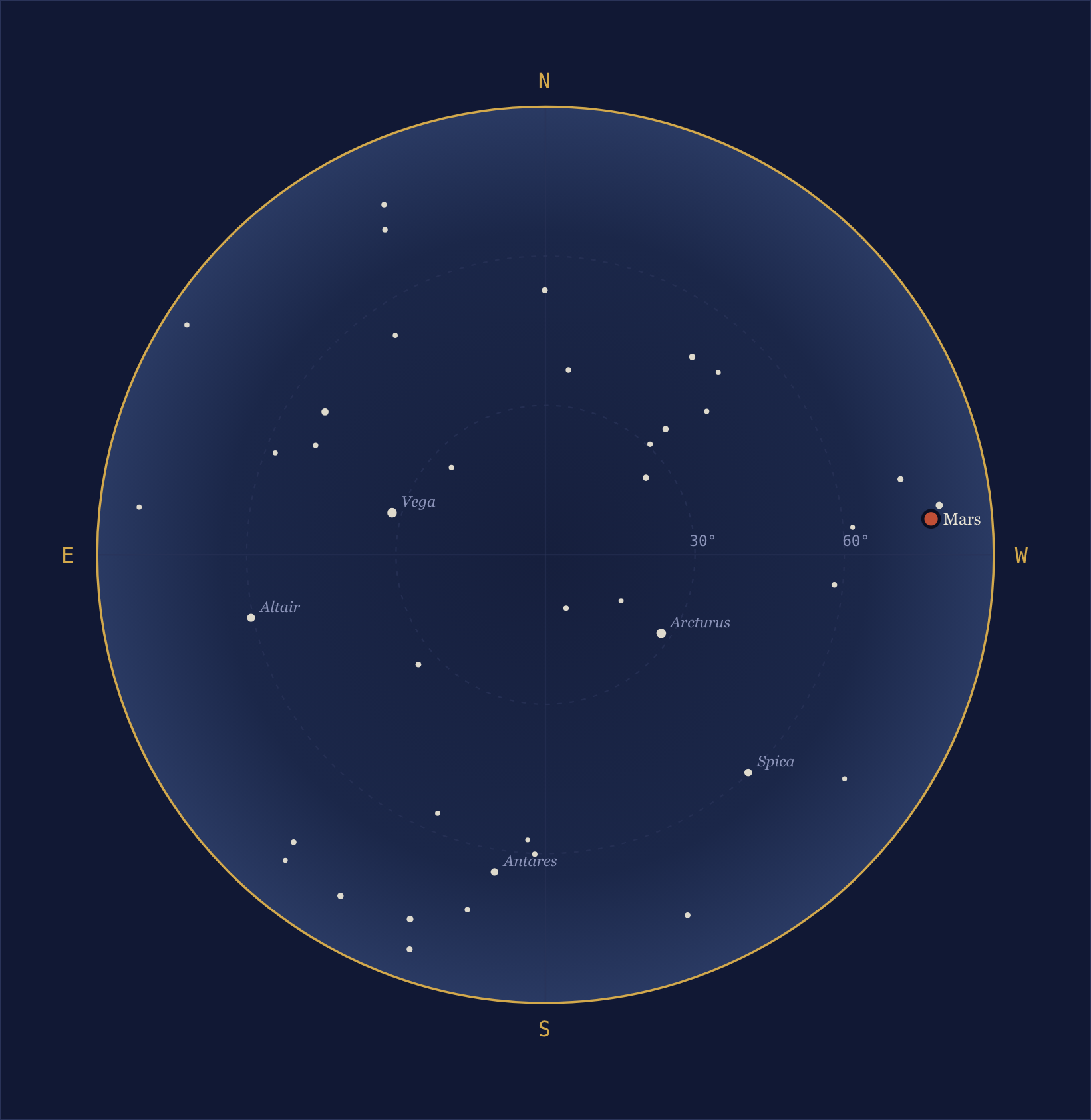
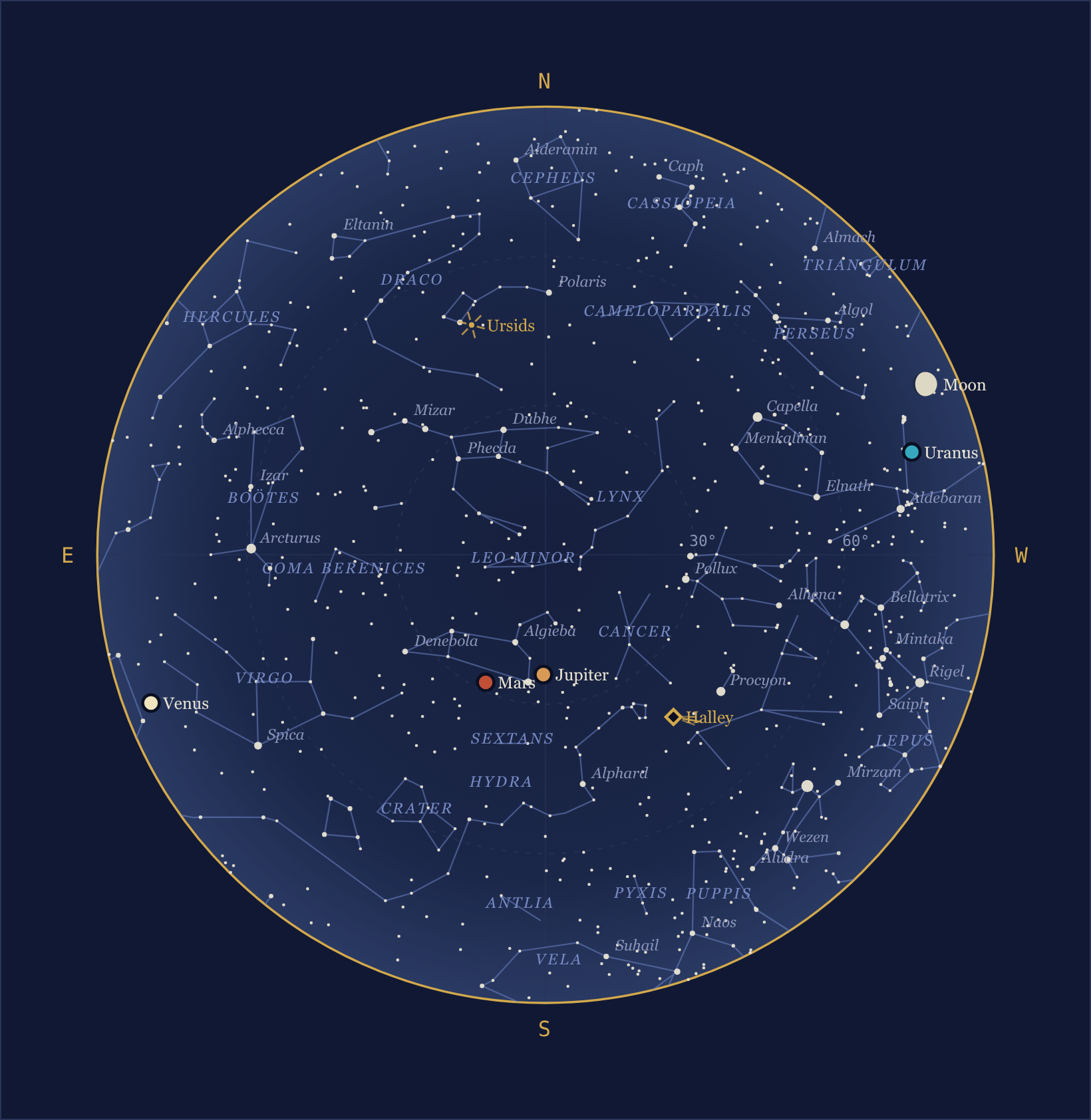
The same panel with a comet risen: a labeled diamond with its tail streaming anti-sunward, hollow because this one is fainter than naked-eye.
Everything above the horizon right now, in sky-chart orientation — north at the top, east at the left, as if lying on your back looking up: the sun, the moon drawn at its true phase, the planets, and the stars sized by magnitude, with hover coordinates on every mark. When the sun is up the stars are shown dimmed, standing where they are behind the daylight (sun_is_up, below, lets a caption react). dome_svg additionally takes label_scale (default 1.0), which grows every label by that factor with the collision layout following along — useful when a skin displays the chart scaled down, such as a fixed-canvas smartphone page: $sky_page.dome_svg($almanac, palette='light', label_scale=2.2). (For a page that is simply narrow, prefer the narrow frame, which redraws the dome at phone size instead of enlarging type inside a chart laid out for a desk.) It must be a positive number — numeric text such as '0.8' is accepted — and anything else raises a template error naming the argument (2.5 and later; before 2.5 a zero rendered 0px labels and text blanked the panel).
A page that serves more than one layout from a single URL — a desktop layout and, below some width, a phone layout — asks for both label sizes at once with label_layers (2.5 and later), a list of (scale, media_query) pairs:
$sky_page.dome_svg($almanac, label_scale=0.8, label_layers=[(2.2, '(max-width: 600px)')])
The marks are drawn once. The labels are laid out once per scale, each layout in its own <g class="dome-labels" data-label-scale="…"> (the base layer is wrapped the same way, always, layers or not), and the chart’s own <style> shows the layer whose media query the reader’s viewport matches and hides the rest — nothing is fetched and nothing scripted. The rules are scoped to the chart’s plate, its scales and its queries (data-label-layers="0.8 2.2" and a data-label-media key on the <svg> root), so any mix of charts shares a page without one chart’s rules reaching another’s labels; within one chart, give two extra layers queries that cannot both match. A query may contain only letters, digits, spaces and : ( ) , . -, with its parentheses balanced — it is written inside inline SVG, where < and & are markup — so (max-width: 600px) and screen and (orientation: portrait) are fine and the range syntax (width < 600px) is refused. A bad query, scale or pair raises a template error at render time rather than blanking the panel. A live page that moves a mark’s label by its data-body must move every layer’s copy (querySelectorAll, not querySelector).
The dome plots every star of the bundled Hipparcos catalog down to the magnitude limit — a true sky map. Labels stay on named stars; an unnamed star’s hover tooltip gives its Hipparcos number. The dome also draws the 88 constellations’ stick figures, each substantially-risen figure labeled with the constellation’s (translated) name, setting figures clipped at the horizon rim — and, with satellites configured, a position dot for any satellite above the horizon at generation time. A sunlit satellite is a solid dot; one inside Earth’s shadow is drawn as a hollow ring — present but not shining — with its tooltip saying “in shadow”. A configured comet above the horizon plots as a labeled diamond with a small anti-sunward tail (comet tails point away from the sun; the rays carry class="comet-tail"), always (the config list is the filter): solid brass when its magnitude says plausibly naked-eye (6.0 or brighter), the hollow ring when fainter — there, but not visible to the eye — with the magnitude in the tooltip. And while a meteor shower is active, its radiant gets a small rayed mark when above the horizon — meteors stream outward from that point — labeled (yielding when space is tight: a radiant is an area of sky, not a body), with ZHR and peak date in the tooltip. The dome is strictly the current sky, one chart, one instant: an upcoming visible pass is charted by pass_chart_html below, at the pass’s own epoch. The star_mag_limit and star_label_mag options set the star cutoffs and constellation_lines = false turns the figures off — see Configuration; when embedding the panels in your own skin, set them in that skin’s report section the same way.
An embedding skin that repositions dome marks between report cycles — weewx-celestial’s live dome is the consumer — locates them by machine name, never by tooltip text (which is translated): the sun’s, moon’s and each planet’s marks are wrapped in <g class="dome-body" data-body="mars">, their name labels carry the same data-body attribute (one copy per label layer, all of them inside <g class="dome-labels"> groups — move every copy), and a satellite’s position dot gets its tag name the same way plus data-sunlit="1" or "0", so a live layer can flip the dot between solid and hollow as the satellite crosses the shadow line. A comet’s diamond carries data-bright="1" or "0" the same way. On the pass chart the arc’s own group, <g class="dome-track" data-body="iss">, states the pass’s rise and set as epoch seconds (data-rise/data-set, 2.3.2 and later), so a live layer can tell whether the pass this chart depicts is ahead, in progress or over without consulting a feed whose next pass has already rolled on. These hooks are a stable contract, and so are $sky_page.satellite_names() and $sky_page.comet_names(), through which an embedding skin enumerates the configured satellites and comets — the tag names in config order, empty when none are configured or the almanac is not registered — and $sky_page.can_draw() (2.3.4 and later), True when the Skyfield almanac is registered and the page can draw the sky, False on a lesser tier. It is the same test the dome stands on, without drawing anything, so a page that places only a satellite roster or the pass chart beside someone else’s dome can gate those panels without rendering a dome to learn whether it could.
Five panels need this extension’s almanac and return the empty string without it — dome_svg, pass_chart_html, satellites_html, eot_svg and moon_apsides_html, the set can_draw() reports on. The rest need only an almanac that serves body positions and rise times, so they draw wherever WeeWX has one. Either way a panel that cannot get what it needs comes back empty instead of raising, and weewxd’s log says so once — see Some $sky_page panels are empty. The answer is to install the almanac; gate panels on can_draw() if you would rather your page reserve no space for them.
The next visible pass chart — pass_chart_html
$sky_page.pass_chart_html($almanac)
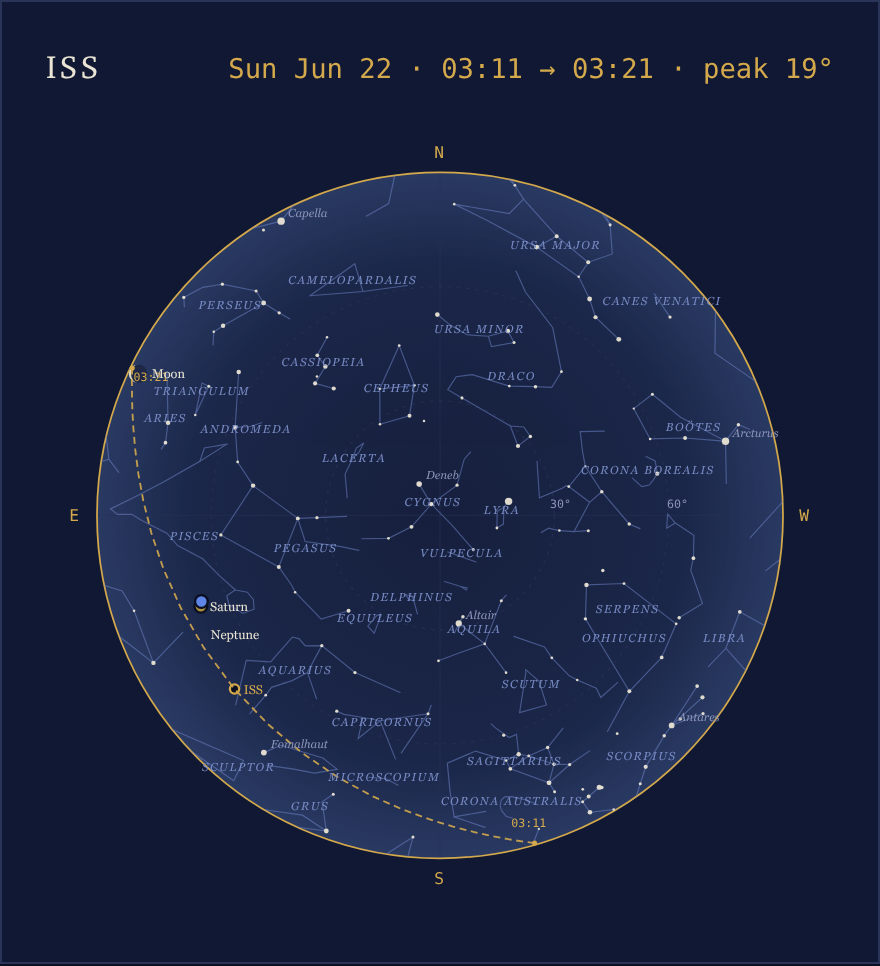
The whole sky as it will stand at the culmination of the soonest upcoming visible pass among the configured satellites, with the pass drawn across it as a dashed arc — rise and set times at the endpoints, the satellite’s own dot at the peak — under a dated head line naming the satellite and the pass (“ISS · Sun, Jun 22 · 3:11 AM → 3:21 AM · peak 19°”). The peak dot can be the hollow in-shadow ring: a pass is visible when any of it is sunlit in a dark sky, and a morning pass often exits Earth’s shadow just after culminating — the chart honestly shows it flaring into view mid-sky. One chart, one epoch: the arc crosses the stars it will actually cross, the per-pass convention sky-charting has always used for future events (the sky dome, by contrast, never shows anything but the current sky). The star field uses twilight-honest cutoffs — a visible pass happens while the sky is only half dark, so only stars bright enough to actually show then are plotted (magnitude 3.5, labels at 1.5) — making it a finder chart rather than a census.
The method returns a passhead div followed by the chart SVG, and an empty string when no configured satellite has a visible pass in its elements’ validity window (up to a week out) — wrap it in a guard as the bundled template does:
#set $passchart = $sky_page.pass_chart_html($almanac, palette=$palette)
#if $passchart
  ...
#end if
Like dome_svg it takes palette, label_scale and label_layers (the head line is HTML outside the SVG, sized by the page’s own CSS, and takes no part in the layers). Its SVG ids (skygp-night, domecp-night, ending in the plate name like the dome’s) stay distinct from the dome’s, so both charts share a page cleanly, and the data-body / dome-track hooks appear here exactly as on the dome — the pass arc’s group, <g class="dome-track" data-body="iss">, lives on this chart. New CSS classes: passhead, passname and passwhen style the head line (see sky.css); the arc and its labels reuse the dome’s satlab/nowlab rules.
Rise & set ribbons — ribbons_svg
$sky_page.ribbons_svg($almanac)
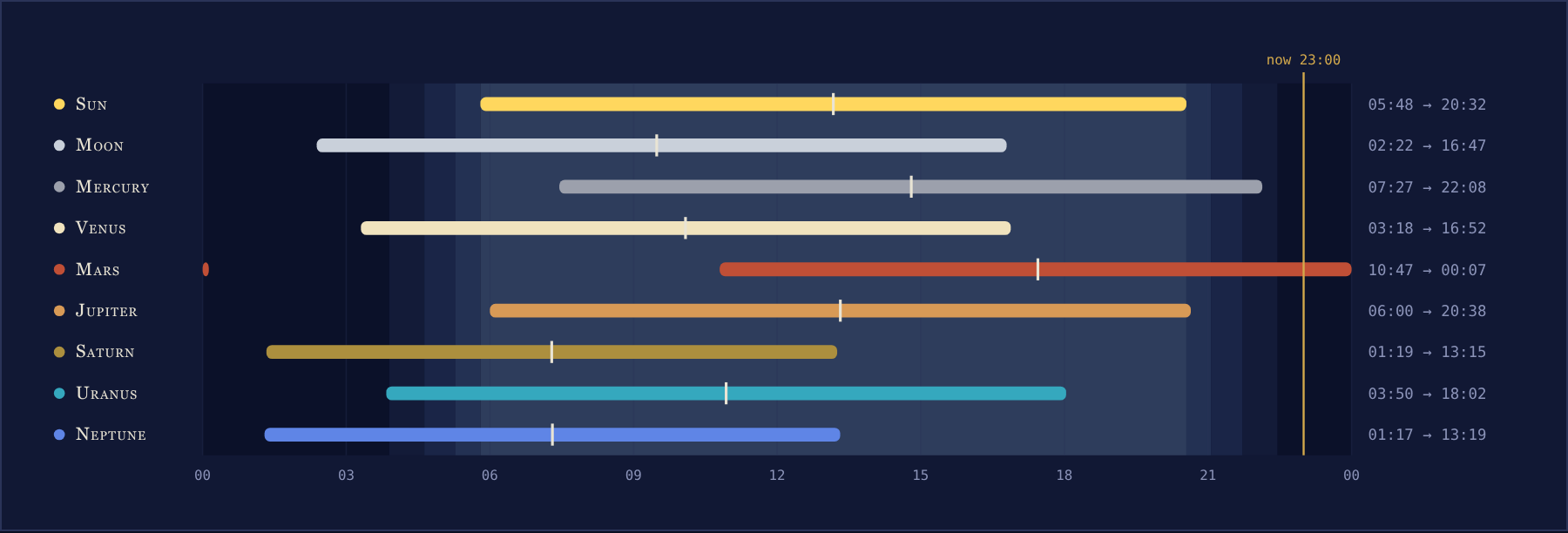
Today’s above-horizon span for the sun, moon and planets — and every configured comet with elements (2.1), as a brass bar — over background bands of tonight’s civil, nautical and astronomical twilight (the USNO geometric definitions). The tick across each bar is the transit; the vertical brass line is now, and the rise → set times are listed at the right. Bars, ticks and the “now” line are drawn over those bands rather than over the panel, so on each plate they carry whatever casing or outline it takes to stay readable there (2.3) — nothing for a skin to configure.
The sun’s path — sunpath_svg
$sky_page.sunpath_svg($almanac)
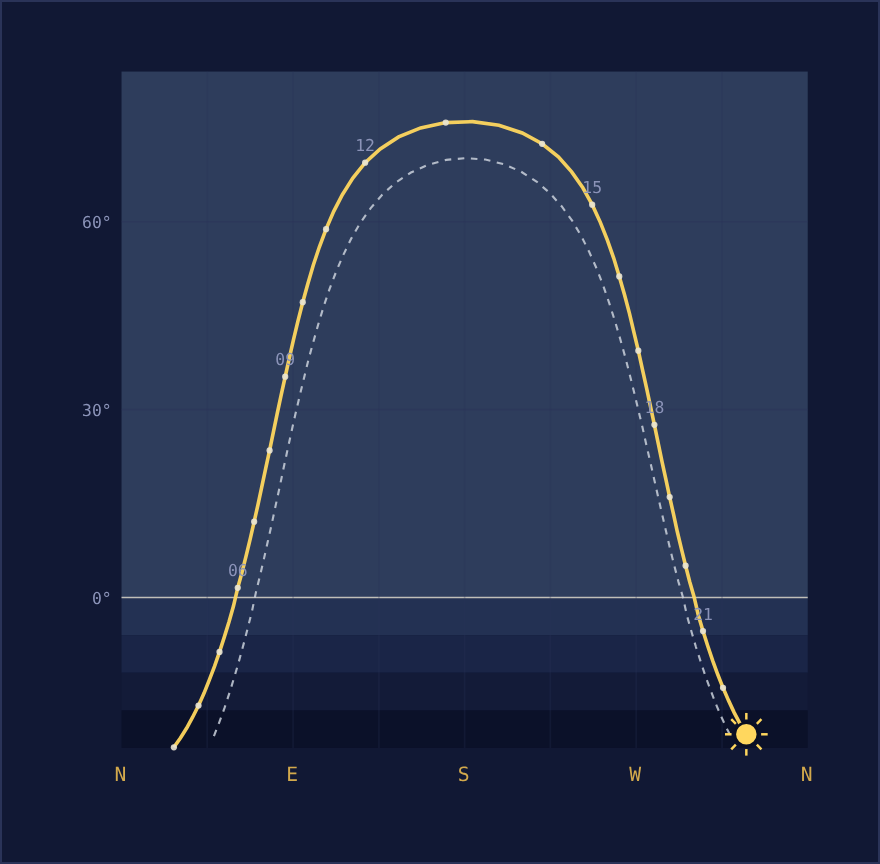
Today’s sun, midnight to midnight, as altitude against azimuth — a dot every hour, labels every third. The dashed curve is the moon’s path, with the moon drawn at its true phase when above the plot floor; the bands below the horizon line are civil, nautical and astronomical twilight depth. Moonrise, moonset and the transit are ticked and labeled on the moon’s curve with the page’s clock times, and the curve’s two ends — the moon’s positions at 00:00 and 24:00 — get dots labeled 00 and 24 when they clear the plot floor. The curve is open between those ends because a lunar day runs about 50 minutes longer than a calendar day, so a day’s track never quite closes; near full moon, when the moon transits around midnight, the break sits right at the top of its arc (the endpoint dots’ tooltips say so). The azimuth axis is the fixed full compass, north to north, so the arc’s seasonal swing between the solstices reads at a glance — and a circumpolar arctic sun needs no special casing.
The orrery — orrery_svg
$sky_page.orrery_svg($almanac)
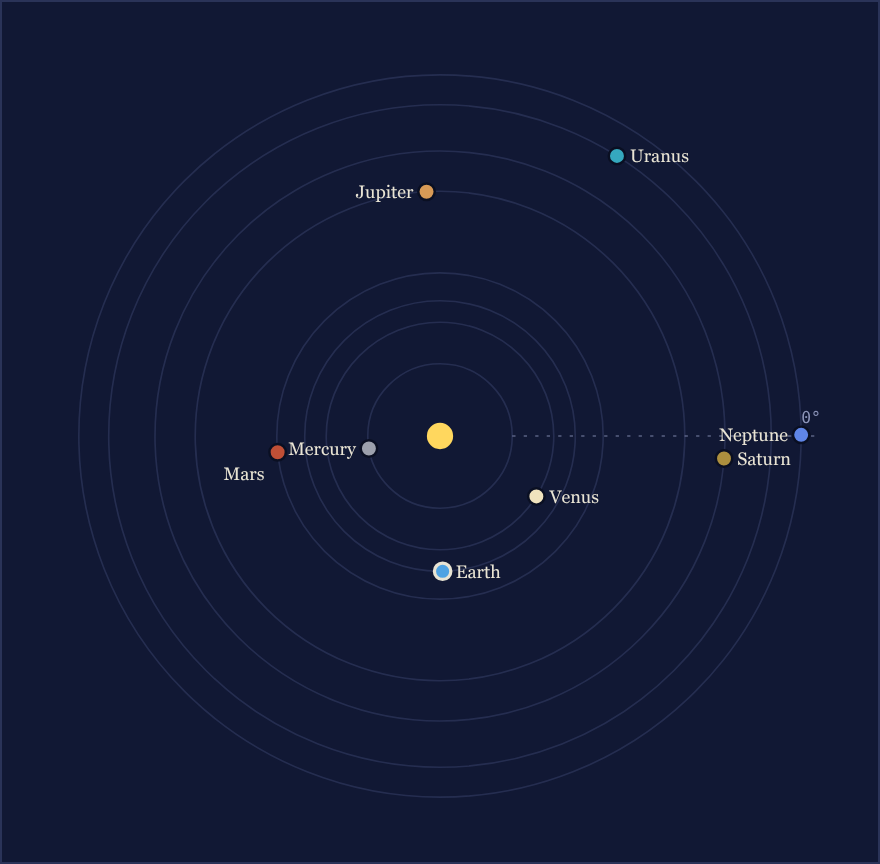
Today’s heliocentric longitudes, viewed from above the north ecliptic pole; orbit spacing is logarithmic so Mercury through Neptune fit one plate. The dashed ray marks 0° — the direction of the vernal equinox. A configured comet joins the plate as a diamond at its current sun distance on the same log scale — marker only, no orbit ring, since an eccentric orbit does not draw as a circle — its tail streaming radially outward (a comet’s tail points away from the sun, and on a sun-centered plan view that is simply outward), with the true distance in the tooltip and the dome’s solid/hollow naked-eye rule; a comet beyond the outermost ring pins near the rim. Unlike the dome, the orrery plots a comet whether or not it is above the observer’s horizon: it is a plan view of the solar system, not the observer’s sky.
The equation of time — eot_svg
$sky_page.eot_svg($almanac)
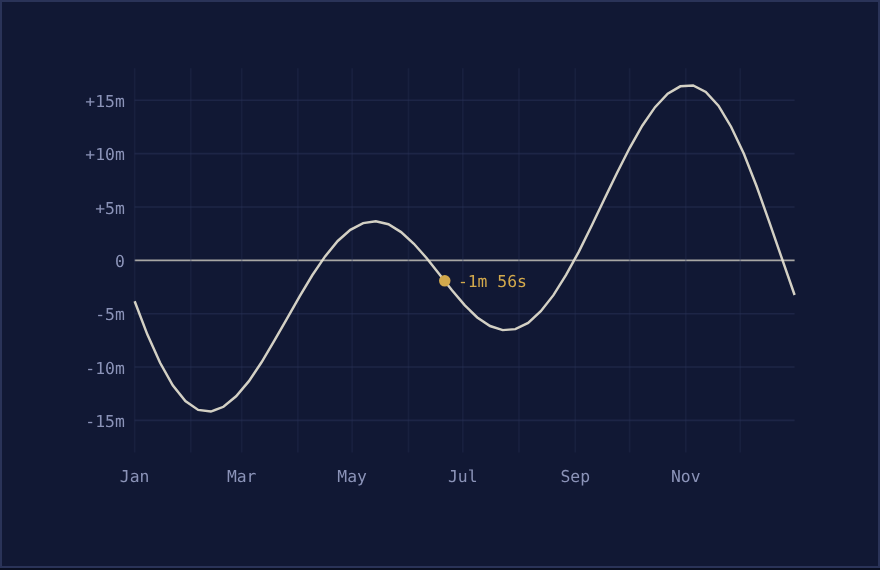
The equation of time across the year (2.1) — sundial minus clock, per the USNO sign — sampled at the analemma’s own instants, local standard noon each week. The double-humped curve is the sum of Earth’s tilt and its elliptical orbit, the same pair that draws the analemma’s figure-eight; the brass point is today, labeled with today’s standard-noon value — its own evaluation, not the nearest weekly sample. The frame is fixed at ±18 minutes, so the plate looks the same every year. The bundled page places it in the left column beside the Solar Year chart, its year-scale sibling.
The analemma — analemma_svg
$sky_page.analemma_svg($almanac)
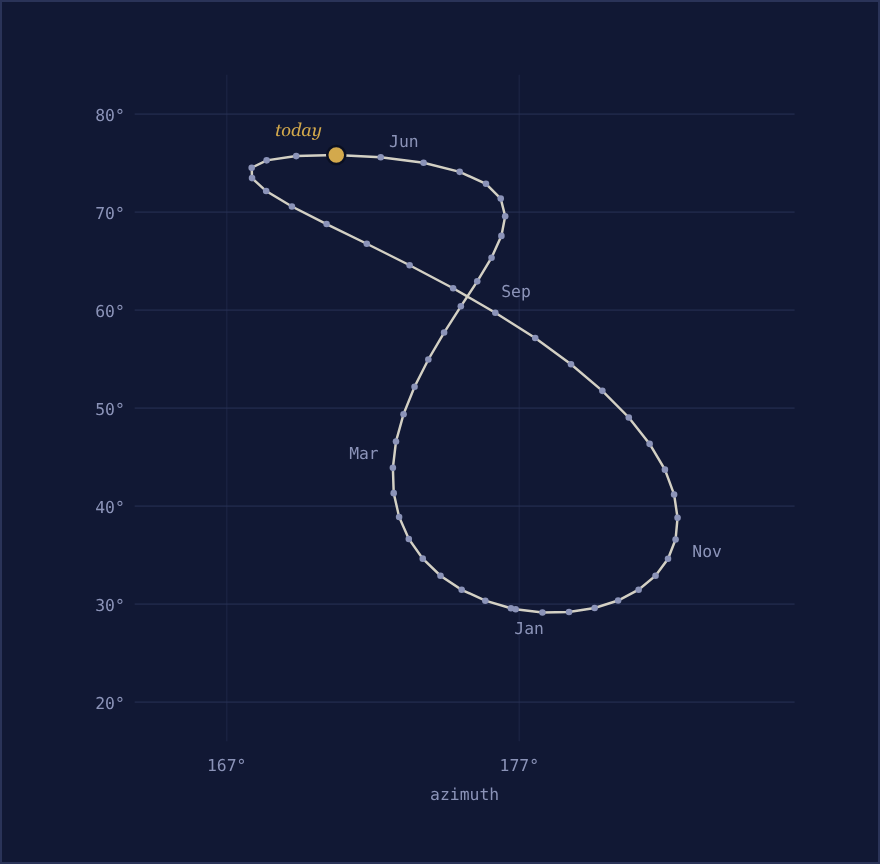
The sun’s altitude and azimuth at local standard noon for every week of the year — the figure-eight sum of Earth’s tilt and its elliptical orbit — with today’s point marked in brass at its own standard-noon spot on the locus. It evaluates the almanac 54 times (all cheap instantaneous positions).
The solar year — daylength_svg
$sky_page.daylength_svg($almanac)
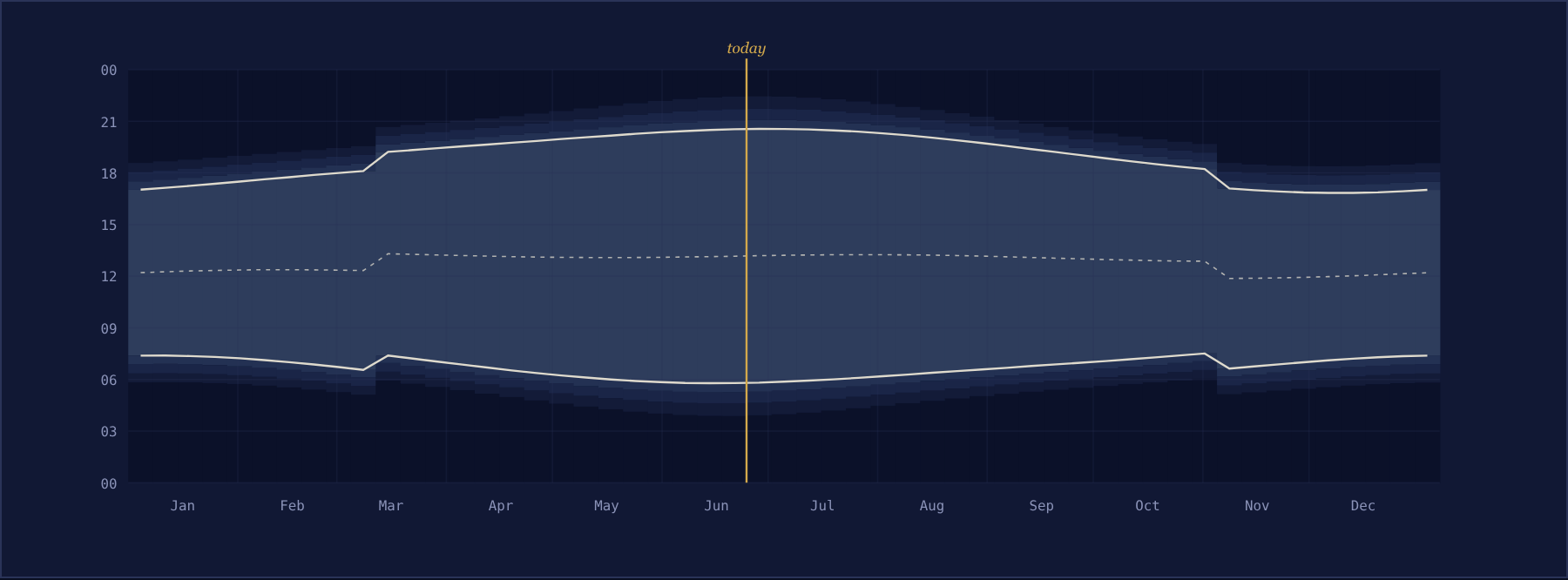
Sunrise, sunset and solar noon (dashed) for every week of the year, over the same civil/nautical/astronomical twilight bands as the ribbons — with today’s brass line. Times are local clock time, so the daylight-saving steps in spring and fall are real and deliberate; the dashed solar-noon curve carries the equation of time (and the same DST steps). Polar day and polar night render correctly as all-day and no-day columns. This is the page’s most expensive panel — several hundred rise/set searches — but they are anchored to fixed weekly instants, so the result cache reuses them across report cycles and the full cost is paid only on the first render after startup.
The moon disc — moon_svg
$sky_page.moon_svg($almanac)
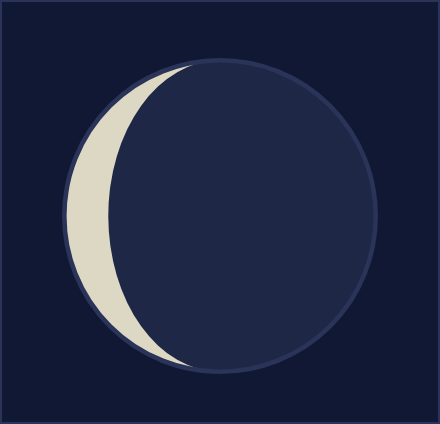
The moon at its true phase, waxing and waning on the correct limb. The optional size argument (default 76) sets the SVG’s intrinsic pixel size; with the bundled stylesheet’s svg{width:100%} rule the disc fills its container, so size the wrapping element.
The bundled page labels the disc with $sky_page.moonset_html($almanac), a one-line <div> giving tonight’s moonset in the report’s own time format, and nothing at all where the almanac has no moonset to give.
The lunar month — lunation_svg
$sky_page.lunation_svg($almanac)

The current lunation, previous new moon to next, as a strip of thirty phase discs — the principal phases ticked and dated, today’s disc ringed in brass, and every disc carrying its date and illumination on hover. Waxing and waning fall on the correct limb for your hemisphere, matching the moon disc above.
The bundled page follows the strip with $sky_page.moon_apsides_html($almanac) (2.1): the quiet next-perigee/next-apogee line, topped by a brass supermoon callout whenever the next full moon falls within a day of perigee. Like the satellite pass cards, the callout is anticipation — it appears ahead of the event and leaves with it. The styling rides the .supermoon and .apsis classes in sky.css, and the strings are translated in all nine bundled languages.
Planet chips — chips_html
<div class="chips">
  $sky_page.chips_html($almanac)
</div>
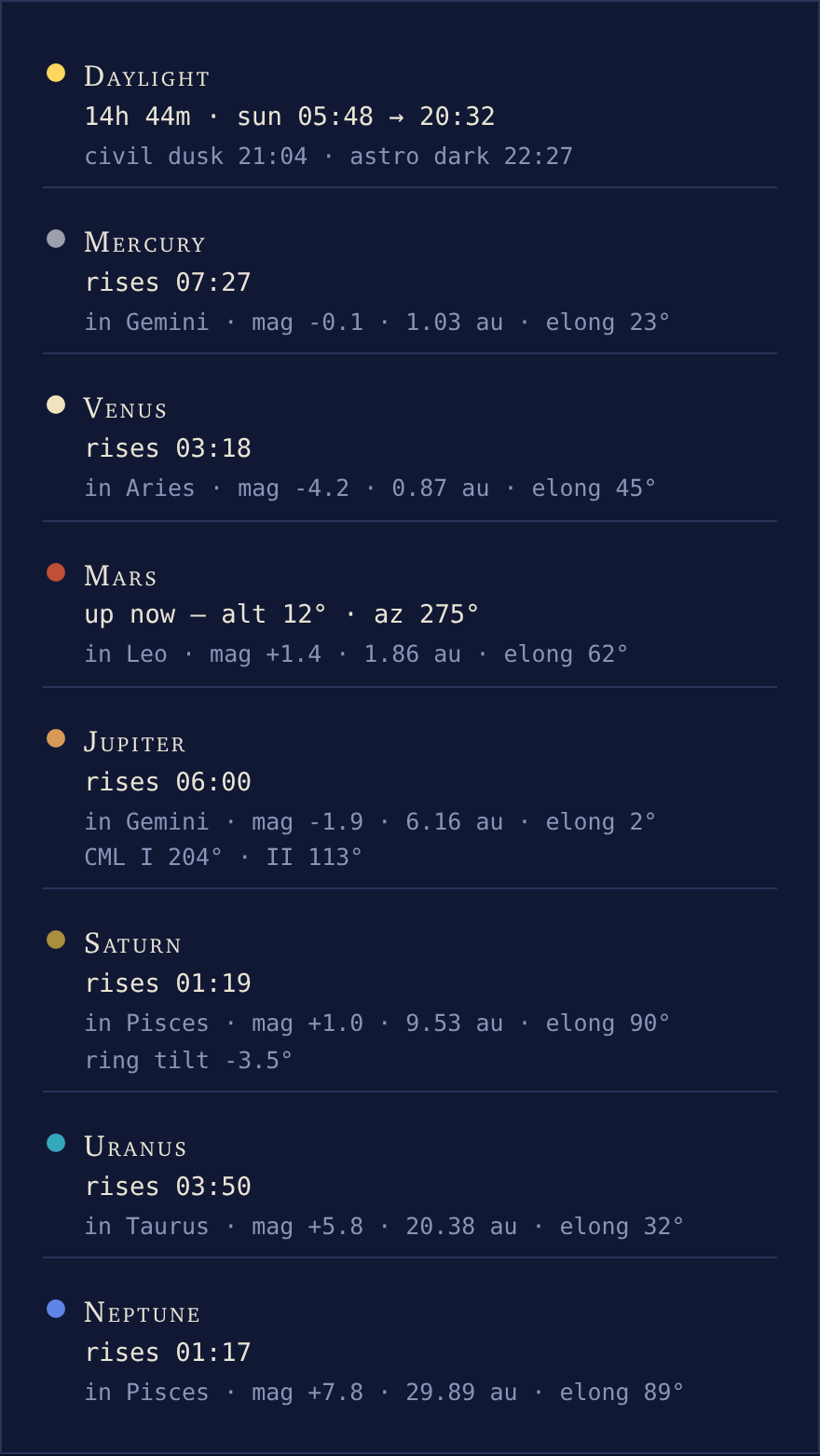
A summary card per body: daylight (length, sun rise → set, civil dusk and astronomical dark), then each planet with its rise time or current position, the constellation it stands in, magnitude, distance and elongation — plus Jupiter’s central meridian longitudes and Saturn’s ring tilt. Every configured comet with elements gets a brass-dotted chip (2.1) of the same shape (its magnitude a dash when the MPC row has no parameters), and the bundled page’s eyebrow reads “Sun, Planets & Comets” when any comet is configured. The chips wrapper provides the single-column layout.
The satellites panel — satellites_html
#if $sky_page.has_satellites()
<div class="chips">
  $sky_page.satellites_html($almanac)
</div>
#end if
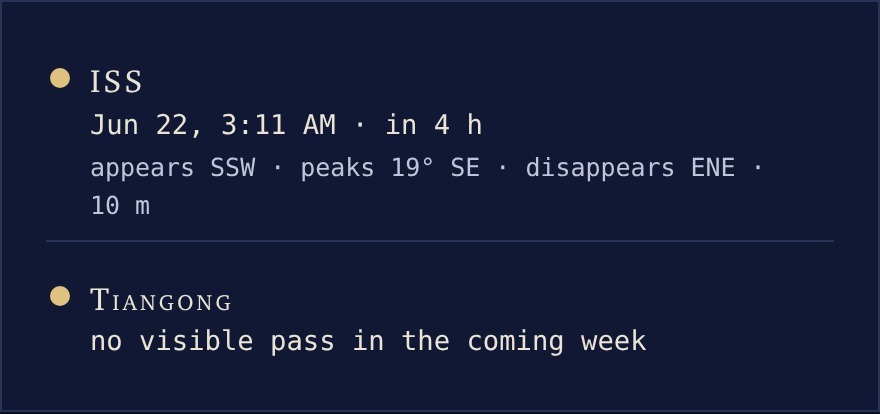
One card per configured satellite (see Satellites): its next visible pass — the date and countdown in the countdown-chip idiom, rolling into “overhead now” during the pass itself, then “appears WSW · peaks 45° SSW · disappears NE · 6 m”. The rows are honest about nothing-to-see: a satellite with no visible pass in the coming week says so, and one with no usable orbital elements says that, pointing at the weewxd log — the panel never shows a stale pass. $sky_page.has_satellites() returns whether any satellites are configured, so a template can skip the whole section when there are none — the bundled page does exactly that.
Countdown chips — countdown_html
<div class="countdown">
  $sky_page.countdown_html($almanac)
</div>

Date and days-to-go chips for the next new moon, full moon, equinox and solstice, plus the next eclipse visible from the station (lunar or solar, whichever comes first, labeled with its locally seen type; its date carries the year, since the next visible eclipse can be years out). A configured comet’s perihelion joins the row (2.1) when it lies ahead within a year — the news-cycle countdown; Halley’s 2061 date stays quiet until its time comes — and the next major meteor shower is always there, its detail line carrying the moon’s peak-night illumination as the interference judgment: a bright moon washes out the faint meteors, and the chip says so. The days-to-go line counts local calendar days, so it always agrees with the date above it: an event just after midnight reads “in 1 day”, and one later today reads “today at 9:14 PM” — on the day itself the clock time is the one thing the chip is not already showing. The countdown wrapper lays the chips out as a wrapping row.
The almanac table — table_html
<div class="tablewrap">
  $sky_page.table_html($almanac)
</div>
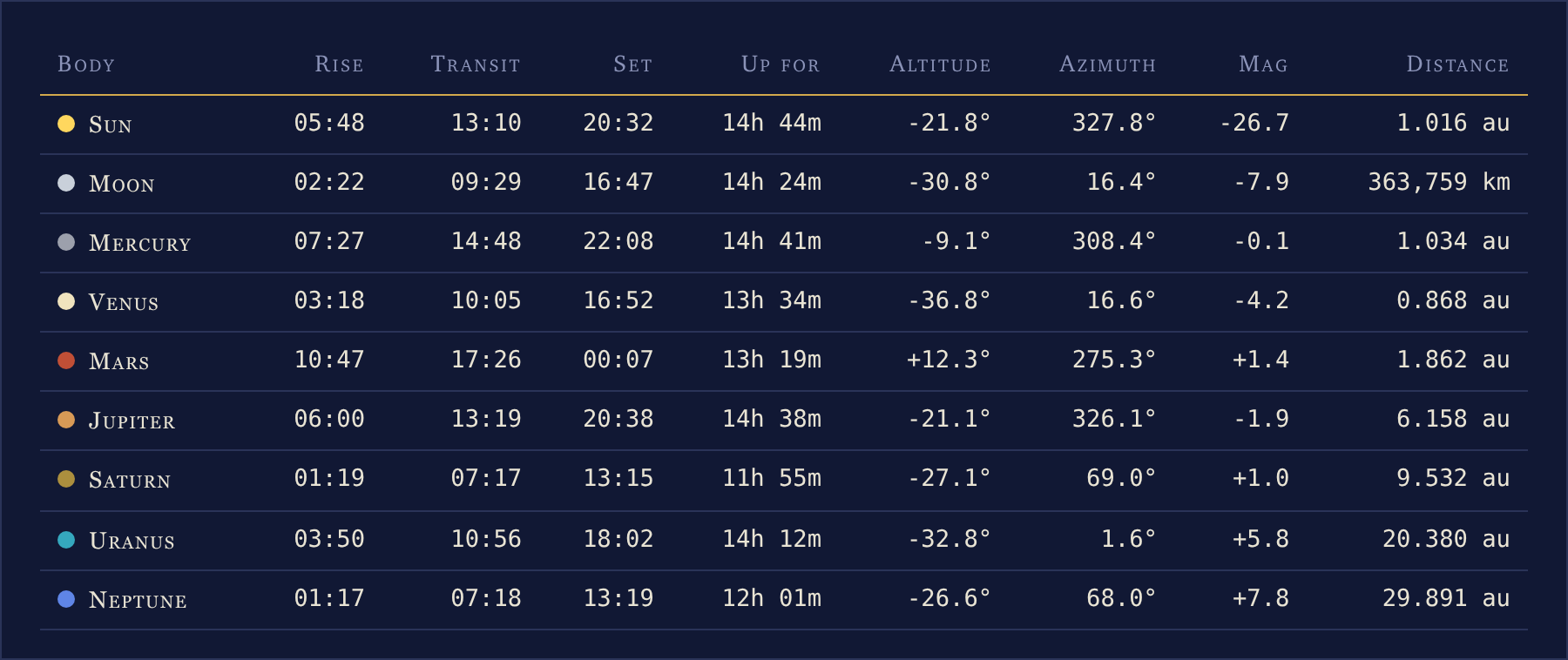
Rise, transit, set, time up, current altitude and azimuth, magnitude and distance for the sun, moon and planets — and every configured comet with elements (2.1), brass-dotted, its magnitude a dash when the MPC row carries no parameters. The tablewrap wrapper lets the table scroll sideways on narrow screens instead of breaking the page.
The footer credit — footer_html
$sky_page.footer_html()
The credit line the bundled page carries, and the one panel you should copy if you embed any of the others: it names the libraries and data sources that actually produced the page — Skyfield, JPL’s DE421, the IAU-CSN star names, the Hipparcos catalog, the Stellarium sky culture, CelesTrak for satellite elements, the Minor Planet Center for comet elements, and the IMO for the meteor shower data — and the ESA acknowledgment is required exactly when Hipparcos data is shown, which this line handles for you.
Most of those are conditional on what the page actually drew: the star credits appear only with a live catalog, Stellarium only when the figures are on and the lines file loaded, CelesTrak only with satellites configured, the Minor Planet Center only with comets. The IMO credit is unconditional, because the shower list is built in and the countdown row always carries the next shower. Nothing is credited for data the page did not use.
It is also a diagnostic. The full credit appears only when the registered Skyfield almanac and its star catalog are live; if the almanac is not registered, or the star catalog failed to load, the footer says that instead and points at the weewxd log. A page rendering off the built-in almanac’s fall-through therefore admits it in print rather than looking correct.
Helpers — theme, palette, header_sub and sun_is_up
$sky_page.theme($almanac) and $sky_page.palette($almanac) are how an embedding skin offers the two plates without reimplementing anything. Both read the option from your report’s stanza, not from the bundled skin’s, so adding theme = dark | light | auto to your own [[YourReport]] section is the only step:
#set $theme   = $sky_page.theme($almanac)      ## 'dark' or 'light'
#set $palette = $sky_page.palette($almanac)    ## 'night' or 'light'
<html lang="$lang" class="theme-$theme">
theme() resolves auto itself — light while the sun is up at generation time — so you inherit that logic rather than writing it; palette() returns the matching palette name to hand to every panel call. Resolve the pair once per page and reuse it: each panel call is individually guarded, so resolving inside each one would let a typo’d theme value cost every chart while the rest of the page rendered. The palette a panel is rendered with is still a generation-time choice — but since 2.4 it is only the default: the marks carry role classes, so a browser toggle can repaint them (see the role classes).
$sky_page.header_sub($almanac) returns The Sky page’s one-line subtitle — station coordinates and the almanac time, e.g. 37.44° N · 122.14° W · Saturday, June 21 2025, 23:00 PDT. $sky_page.sun_is_up($almanac) returns a plain boolean for template logic; the bundled page uses it to switch the dome’s caption between day and night wording:
#if $sky_page.sun_is_up($almanac)
The sun is up, so the plate shows the stars where they stand behind the daylight.
#else
Dot size follows magnitude; the brighter the star, the larger the mark.
#end if