Live-updating pages
weewx-skyfield manual · weewx-skyfield on GitHub · Report an issue
weewx-skyfield computes at report time. Its tags, and the Sky page, refresh once per report cycle — typically every few minutes. That is right for an almanac: rise times do not change between cycles.
But some of what this extension knows does move on a human timescale. A satellite crosses the whole sky in six minutes. A countdown to sunset ticks. For those, a page that redraws in the browser needs values more often than a report cycle can deliver them — and that is a different extension’s job.
How it fits together
Add weewx-loopdata (same author, 6.9 or later). Since loopdata 5.0 it evaluates almanac fields — report almanac tags with the $ removed — against whatever almanac is registered, which is this one once installed. It does that on every loop packet and writes the results to loop-data.txt for your page’s JavaScript to pick up.
$almanac.iss.next_pass.rise        ← the report tag
almanac.iss.next_pass.rise         ← the same thing as a loopdata field
One computation engine serves both, so the live values and the report values can never disagree. There is no second implementation to keep in step — which is exactly why this extension is the engine’s only home.
A field written without .raw, like the one above, reaches your page already formatted, in the tag’s own time context — for a satellite pass that means a dated instant, because the pass can be a week out. Write almanac.iss.next_pass.rise.unix_epoch.raw and format it yourself if your page wants the number.
Writing fields
Three rules cover almost everything.
Drop the $, keep the chain. Anything in the tag index works, including the chains: almanac.moon.constellation.label, almanac.iss.next_visible_pass.max_altitude, almanac.next_meteor_shower.peak.
Pin the unit on every .raw. loopdata walks your target report’s converter, so an unpinned .raw means whatever that report’s units say. Write almanac.sunrise.unix_epoch.raw and almanac.sun.visible.second.raw. A [Units] [[Groups]] override on the target report can otherwise silently change what a field means — see the .raw trap.
Everything is a plain attribute. loopdata resolves chains with plain getattr, which — unlike Cheetah — does not call methods for you. This extension serves pass attributes, shower attributes and constellation.abbr as plain attributes precisely so they work as fields. The exceptions are the callables listed in Values, units and types; visible_change() and separation() cannot be loopdata fields.
Event fields and why the names matter
loopdata tiers almanac fields by their names: a field whose leaf begins with next_ or previous_ is an event field, computed once and held until it expires rather than re-derived on every loop packet. A moon-phase or eclipse search on every packet would be ruinous; held as an event, it costs nothing.
This is why several tags here are spelled the way they are. next_perigee, next_supermoon, next_perihelion and the rest carry the next_ prefix deliberately — an unprefixed spelling would rerun an extremum search on every loop packet. When you add a field, prefer the next_-prefixed spelling where one exists.
Event expiry is also what rolls a finished satellite pass forward to the next one the moment it ends, which is loopdata 6.9 behavior: earlier versions could cache a temporarily unavailable satellite field’s N/A until the day rolled over, instead of recovering as soon as fresh elements arrived. That is the reason for the 6.9 floor.
Language
Live values follow the language of loopdata’s target report — one language per loopdata instance. A field such as almanac.moon.label renders in that report’s language, so a station serving two languages needs the label resolved per page rather than per field. See Translations. Body, constellation and meteor shower names need WeeWX 5.3 or later; on 5.2 the fields still publish, in English and Latin.
Reusing this extension’s charts, live
The Sky page’s panels are static SVG, but they are built to be moved by someone else. Every mark a live layer might reposition carries a machine-readable name, and these are a stable contract:
| Hook | On | Meaning |
|---|---|---|
<g class="dome-body" data-body="mars"> | dome, pass chart | The sun’s, moon’s and each planet’s mark; name labels carry the same data-body, one copy per label layer (see dome-labels below). |
data-dome-cx / -cy / -r on the <svg> | dome, pass chart | The chart’s own center and radius, in its own units, for a page that projects altitude and azimuth itself (2.7 and later). Present on a narrow chart, which is 360 units across; a chart without them is the wide frame, whose geometry is frozen and published — cx=340, cy=348, r=296 of a 680 × 706 viewBox. One line reads either: +svg.dataset.domeCx \|\| 340. See Two frames. |
<g class="dome-labels" data-label-scale="2.2"> | dome, pass chart | One label layout (2.5 and later): every label the chart carries, at one scale. A chart asked for label layers has one group per scale, and the labels’ data-body is repeated in each — a live page that moves a label must move every layer’s copy (querySelectorAll). |
data-body="<satellite>" + data-sunlit="1"/"0" | dome | A satellite’s position dot, and whether it is in sunlight — flip the dot between solid and hollow as it crosses the shadow line. |
data-bright="1"/"0" | dome, orrery | A comet’s diamond, and whether it is plausibly naked-eye. |
<g class="dome-track" data-body="iss" data-rise="…" data-set="…"> | pass chart | The pass arc’s group. data-rise/data-set (2.3.2 and later) are the pass’s own rise and set as epoch seconds — judge whether the pass this chart depicts is ahead, in progress or over against these, not against a live feed’s next pass, which rolls on to the following one the moment this one sets. |
$sky_page.satellite_names() | template | The configured satellite tag names, in config order. |
$sky_page.comet_names() | template | The configured comet tag names, in config order. |
$sky_page.can_draw() | template | Whether the page can draw the sky at all — True with the Skyfield almanac registered, False on a lesser tier, where dome_svg, pass_chart_html, satellites_html, eot_svg and moon_apsides_html come back empty (2.3.4 and later). Gate panels placed beside the dome on this rather than on a dome render. |
$sky_page.theme($almanac) / .palette($almanac) | template | The consuming report’s own theme, resolved — see Helpers. Resolve once per page: the palette sets each fragment’s default colors, so a page that re-renders fragments must hand every one the same value or the chart flips plate on a refresh. (The marks’ role classes let your own stylesheet override that default — see the role classes.) |
Locate marks by these names, never by tooltip text — tooltips are translated.
A page that serves both frames from one URL has two copies of every mark, one per drawing, exactly as a chart with label layers has one copy of every label per layer. Move them with querySelectorAll, not querySelector, and read each drawing’s geometry off that drawing — a narrow chart moved with the wide chart’s center puts the mark in the wrong place.
A worked example
weewx-celestial (9.3 or later with weewx-skyfield 2.5) is the reference implementation: a complete live celestial page built entirely from loopdata almanac fields, including this extension’s own dome embedded as a live instrument, with each satellite’s marker swept across the sky in real time and flipping between sunlit and shadow from the same sunlit flag the dome bakes in.
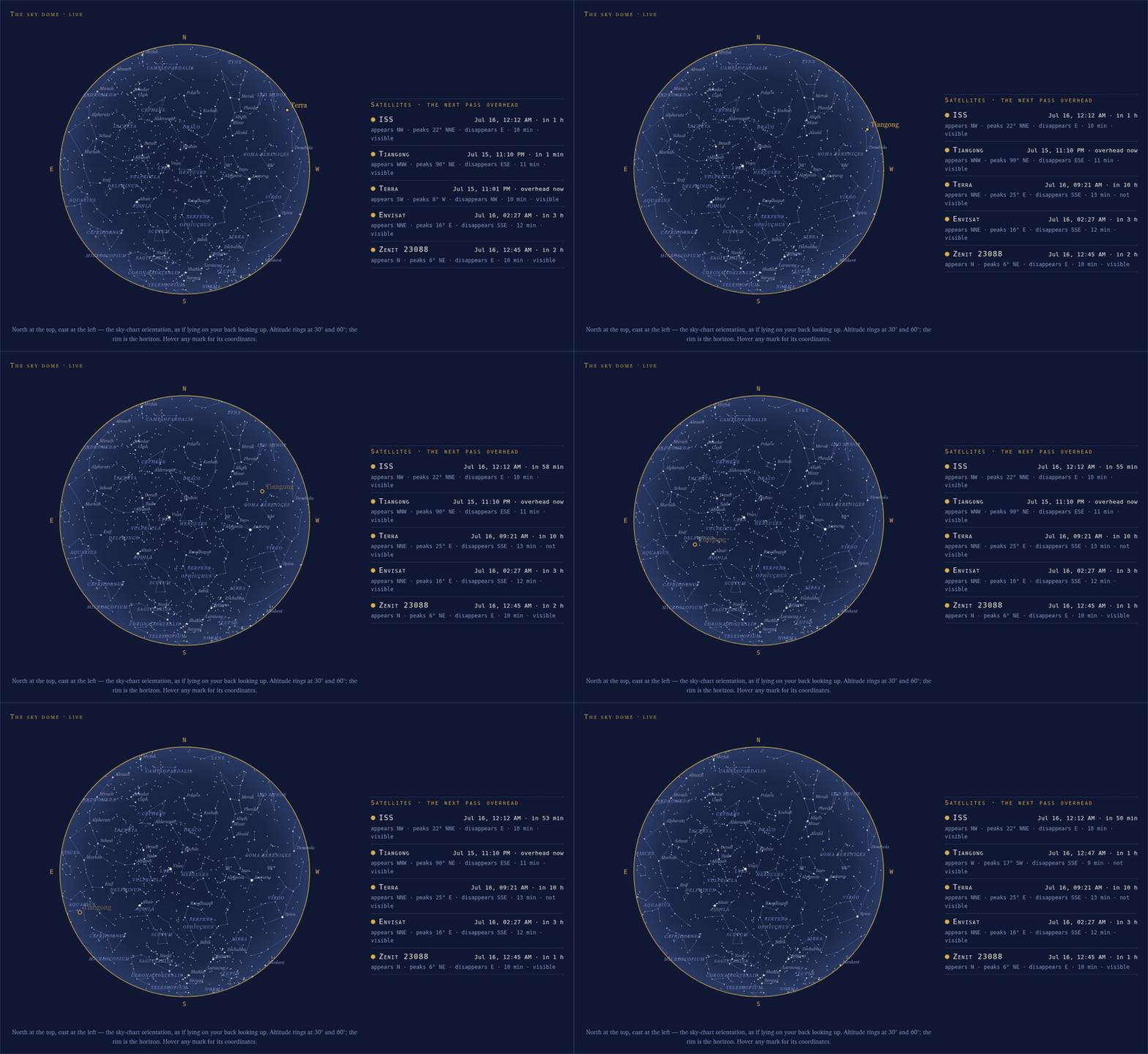
The animation is weewx-celestial’s live page, moved by weewx-loopdata fields — weewx-skyfield’s own Sky page stays static, refreshing once per report cycle. The chart itself is this extension’s dome, embedded there. A third of the way across, still climbing, the marker inverts to a hollow ring as Tiangong slips into Earth’s shadow — and it goes on to cross the exact center of the dome dark, no longer shining. In the opening seconds Terra is finishing its own low western pass: two satellites on the dome at once.
The paloaltoweather.com celestial pages update the same way.
Do you need this?
No, and most stations do not. Every tag and every panel works with this extension alone. Add loopdata when a page needs to show something moving — a pass in progress, a ticking countdown — and not before.