The sample report
weewx-nws manual · weewx-nws on GitHub · Report an issue
Installing weewx-nws installs a report as well as the tags. It publishes three pages to <HTML_ROOT>/nws/ and needs no configuration: forecasts appear on your site at the first report cycle after the install. It is meant to be useful as it stands and to be read as worked examples — every page below is rendered and checked on every release.
The pages are responsive, so one page serves a phone and a desktop — there is no second mobile skin to keep in step — and they follow your reader’s own light or dark setting.
The pages fetch nothing: no request goes to api.weather.gov, no font or script is loaded from anywhere else, and the page does not reload itself.
The seven-day page
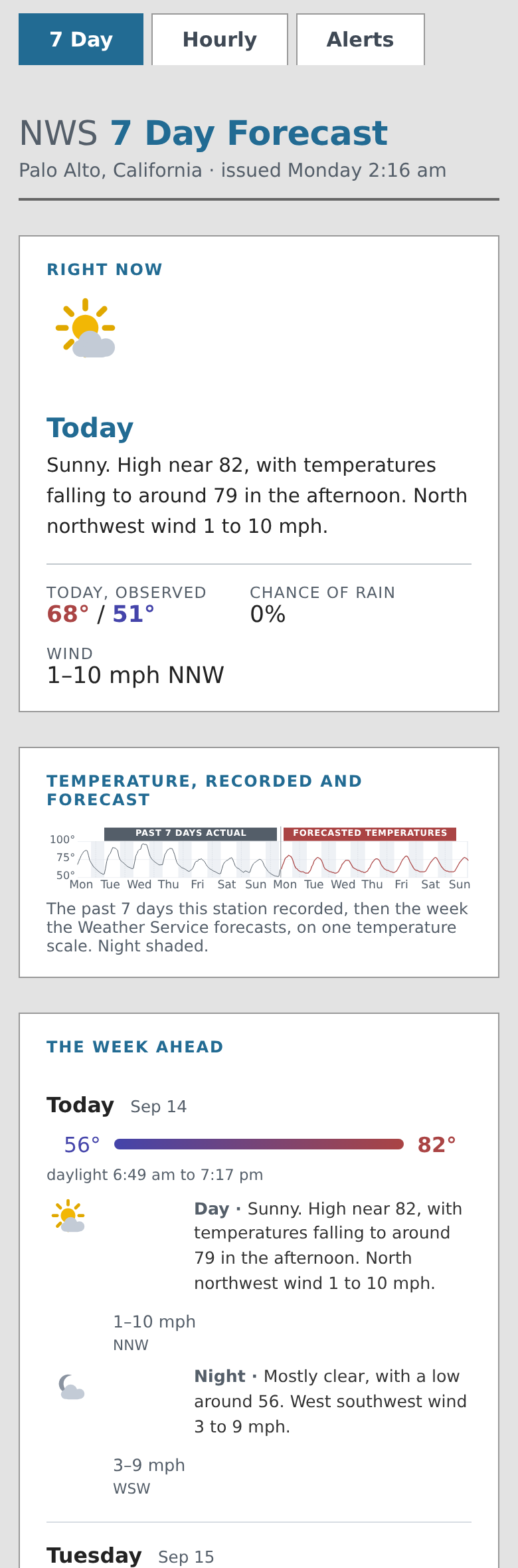
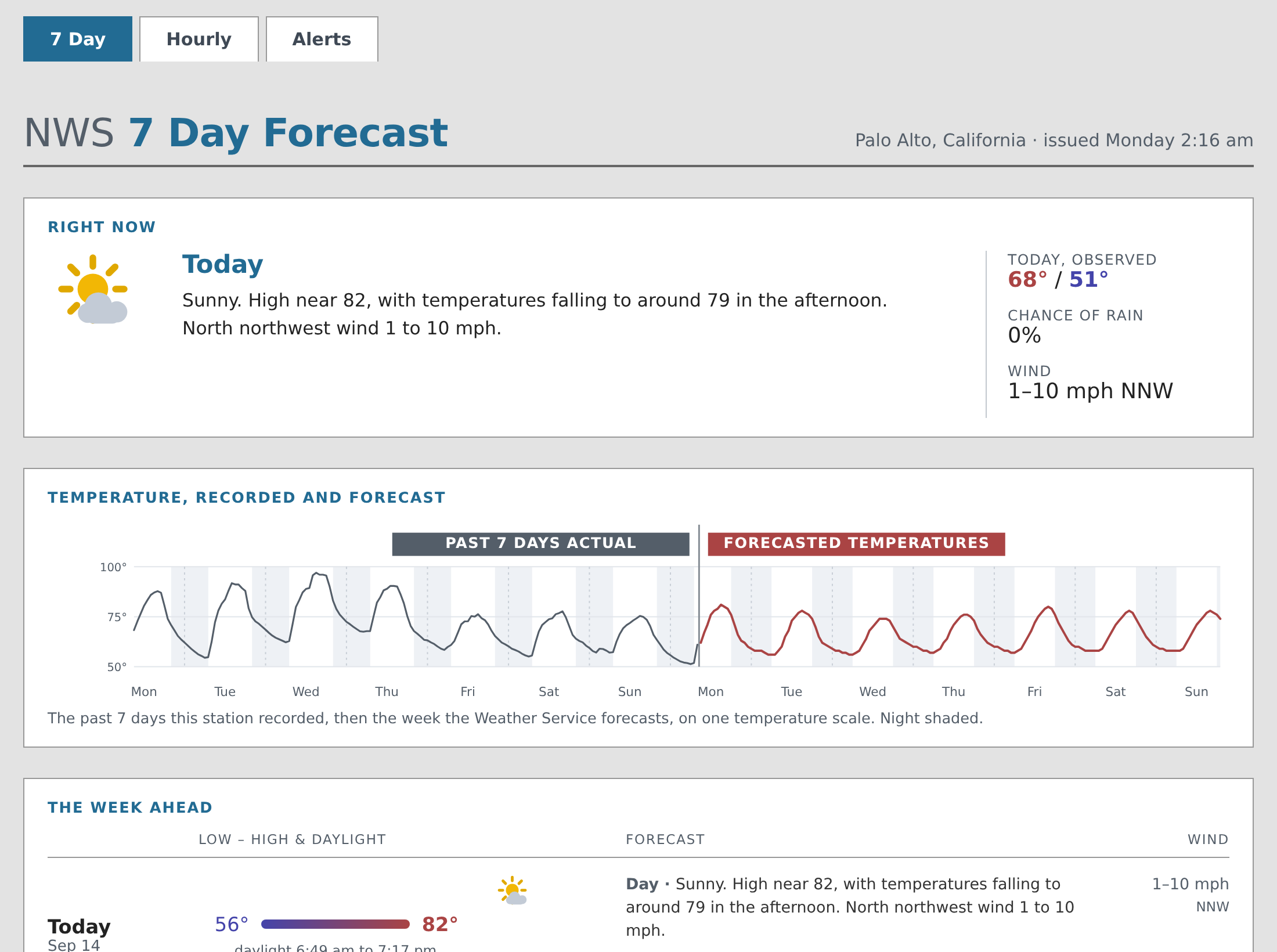
index.html — NWS’s twelve-hour periods. A Right now card leads with the current period’s icon and forecast beside your station’s own observed high and low for today.
Below it, two weeks of temperature on one scale: every hour your station recorded for the past week, then every hour NWS forecasts for the week ahead, with night shaded. One scale for both is the point — a cold snap last week rescales the forecast half, and warm for the week and warm for the fortnight are different claims. The join is marked and labeled, and the two curves are deliberately not connected across it: NWS forecasts a grid square and your station measures its own back yard, so the last reading and the first forecast hour seldom agree, and that step is worth seeing. Point at the chart to read any hour; the reading says whether it is observed or forecast.
If your station has not been running for a week you get exactly the history you have — three days of archive draw three days of chart — and if it has no archive at all, which is every fresh install, the chart is the forecast week alone. An hour your station recorded nothing in leaves a gap in the line rather than a confident stroke across it, so an outage reads as an outage.
Then one row per calendar day: the day’s low-to-high bar positioned across the week’s range, its daylight hours, and each of that day’s periods as a line carrying the icon, the chance of rain, NWS’s own sentence, and the wind.
The hourly page
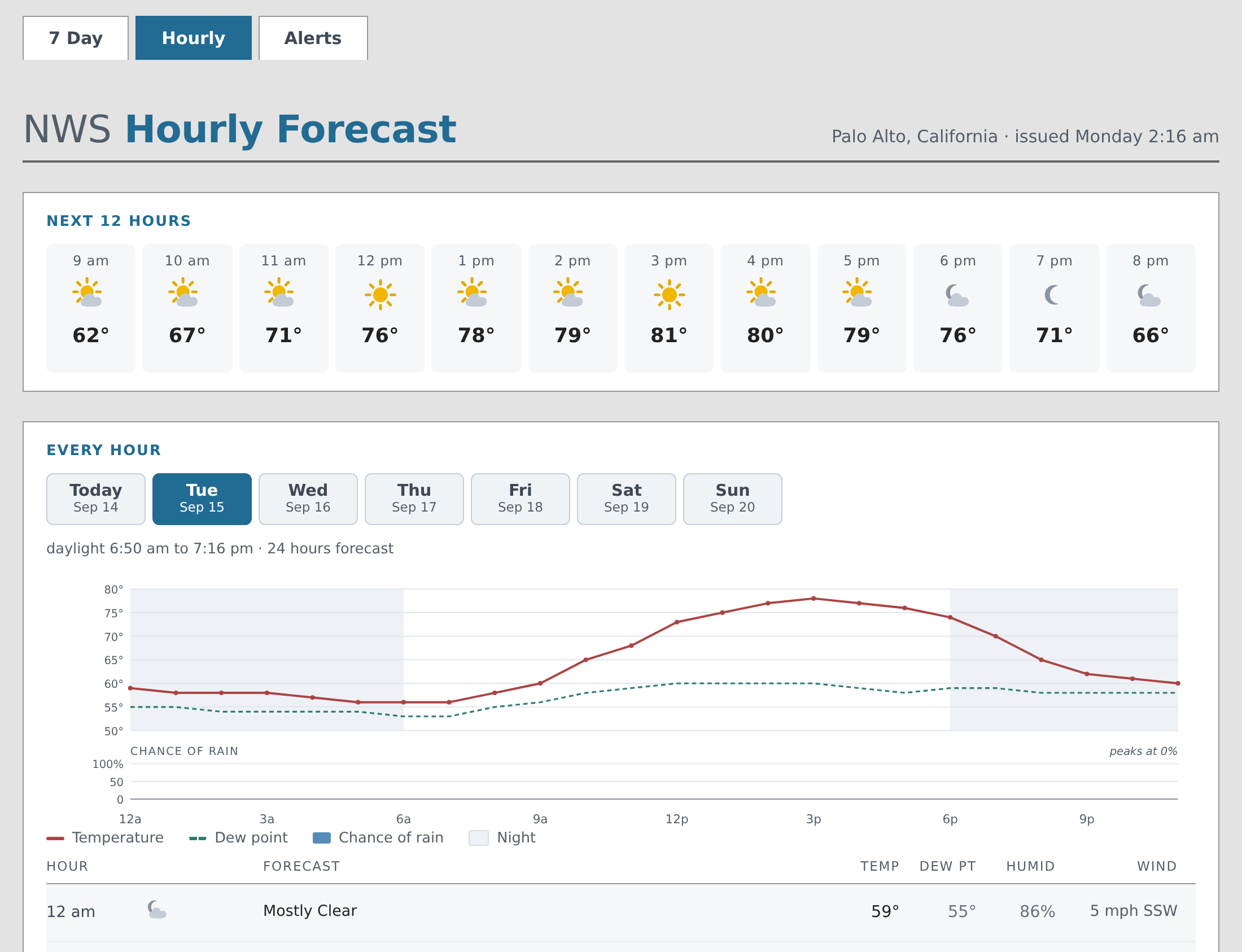
hours.html — NWS’s one-hour periods, about 156 of them. A strip across the top gives the next twelve hours at a glance. Below it, one tab per calendar day, each carrying that day’s chart — temperature, dew point and the chance of rain — and its hour table, with temperature, dew point, humidity and wind. At the foot, the whole week as one curve, for the trend rather than the detail.
Point at a chart, or drag a finger across it, to read any hour. A chart is also reachable by Tab: the arrow keys then walk it hour by hour, Shift with an arrow moves six at a time, Home and End jump to the ends, and Escape clears the reading.
The alerts page
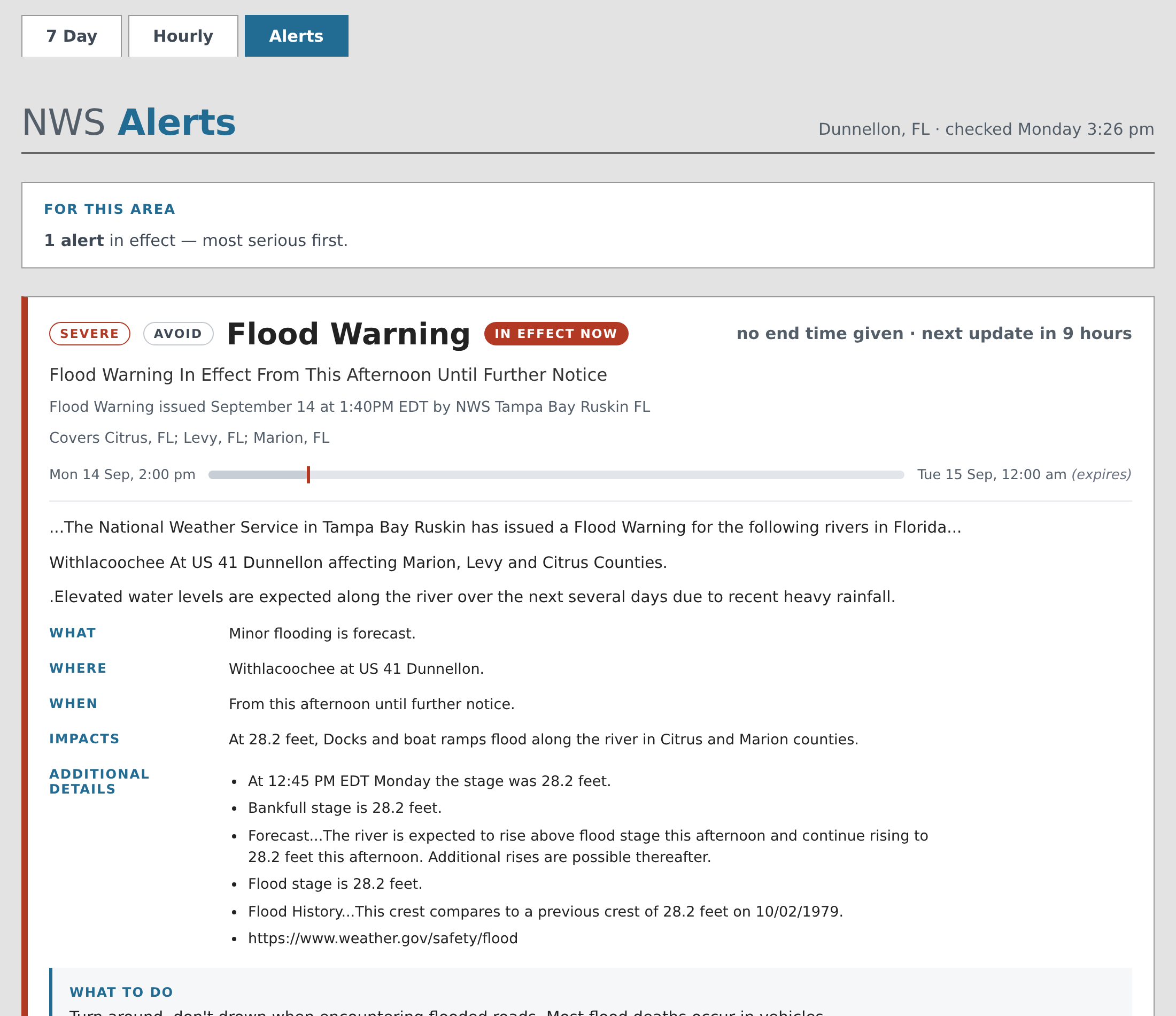
alerts.html — every active NWS alert for the station’s location, in effect first and then most serious first. Each alert is a card whose severity is named in a chip beside the event — SEVERE, MODERATE — and echoed by the colored rail down its edge, with a status badge, a bar showing where now falls between the alert’s onset and its end, the description’s own sections as real structure, and any instructions called out. A second, uncolored chip gives what NWS recommends doing — AVOID, ACT NOW, TAKE SHELTER — and a line under the headline names the areas the alert covers, folding a long list behind its count.
Most of the time there are no alerts, and the page says so plainly rather than showing an empty list.
The two states are entirely different markup, which is worth knowing if you edit the page: a change tested on a quiet day has not been tested at all on the branch that matters. The repository’s tests/validate_skin_html.py renders both.
Light and dark
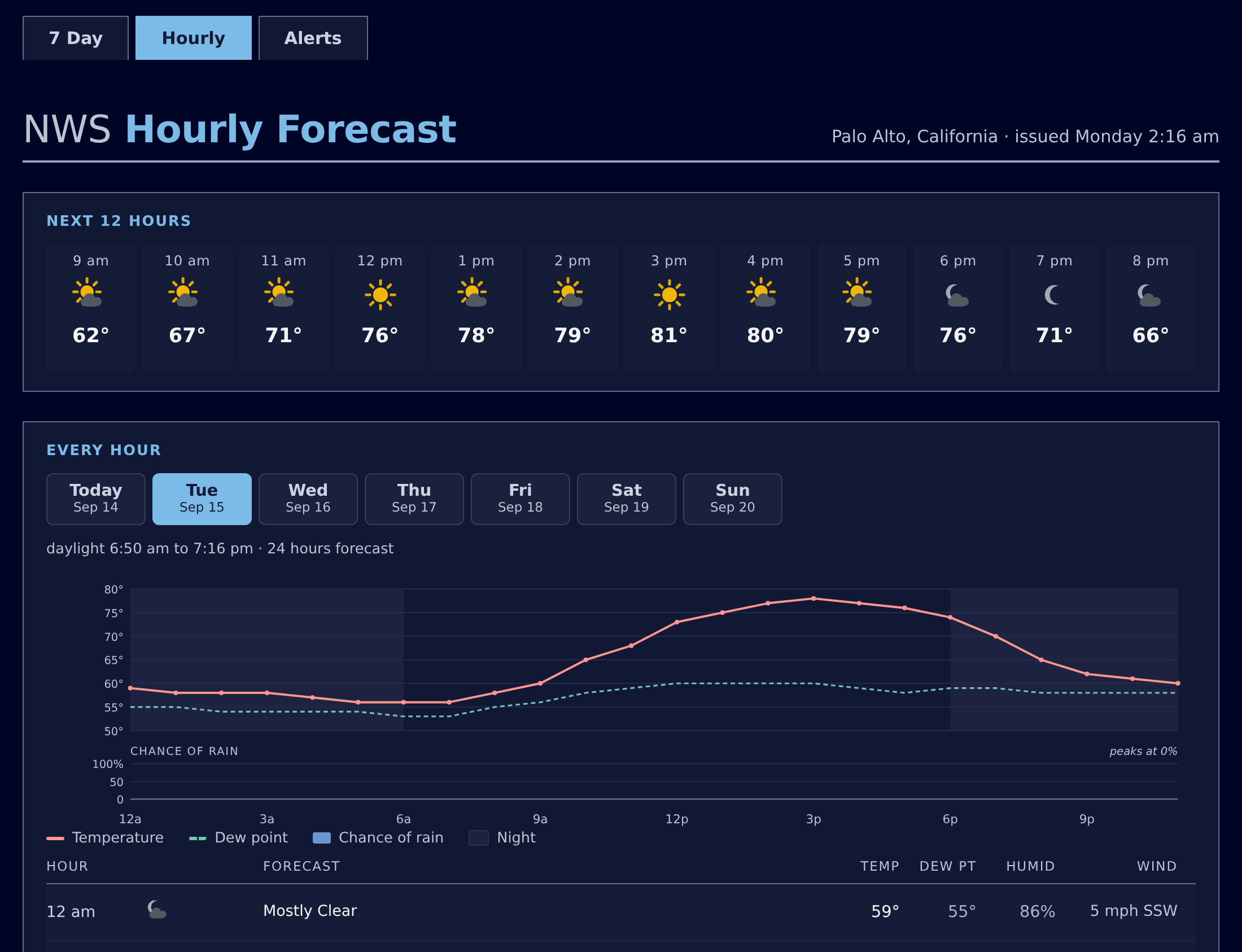
The pages follow prefers-color-scheme — the appearance setting on the reader’s own device, which most phones and laptops expose as Light, Dark or Auto. A reader whose device switches at sunset gets a dark page at their sunset; one who has chosen light gets light all day. There is deliberately no theme toggle: a toggle needs javascript, storage and a visible control, and everyone who copied this skin would inherit a widget they might not want.
Every color on the page is a custom property, so a copy of the skin can restyle any part of it by redefining a property rather than by editing rules. The dark values are derived rather than picked — each color reproduces its light counterpart’s prominence against whatever ground it actually sits on, then is lightened as far as legibility requires.
In both themes, every piece of text clears a WCAG 2 contrast ratio of 4.5 and an APCA Lc of 60 on every ground it can land on, whatever its size, and every chart line and marker a reader has to find clears 3.0 and Lc 30. tests/test_nws_css.py checks both palettes color by color, and tests/verify_ink.py checks the rendered pages pixel by pixel, in every tab, chart readout and alert state.
The --fc-* properties this skin defines are its own and may change between releases. The --wx-* properties that color the icons are a contract and will not; see Drawn icons.
What is installed, and where
| File | What it is |
|---|---|
skins/nws/index.html.tmpl | The seven-day page |
skins/nws/hours.html.tmpl | The hourly page |
skins/nws/alerts.html.tmpl | The alerts page |
skins/nws/menubar.inc | The three-tab navigation shared by all three |
skins/nws/css/nws.css | The stylesheet, including the dark palette |
skins/nws/scripts/nws.js | The day tabs, the chart crosshair, and the alert times |
skins/nws/skin.conf | The skin’s own configuration |
skin.conf names two search list extensions and generates the three pages:
[CheetahGenerator]
    search_list_extensions = user.nws.NWSForecastVariables, user.nwsskin.NWSSkin
    [[ToDate]]
        [[[days]]]
            template = index.html.tmpl
        [[[hours]]]
            template = hours.html.tmpl
        [[[alerts]]]
            template = alerts.html.tmpl

[CopyGenerator]
    copy_always = css/nws.css, scripts/nws.js

[Generators]
    generator_list = weewx.cheetahgenerator.CheetahGenerator, weewx.reportengine.CopyGenerator
The two extensions are different in kind, and the difference matters if you build on this:
user.nws.NWSForecastVariablesis the$nwsforecasttag API — the forecast itself, the drawn icons, and the NWS and CAP semantics every skin needs. It is documented, and it is stable. See Tags.user.nwsskin.NWSSkinis$nwsskin: this report’s charts, chips and alert cards. It is presentation, it is not an API, and nothing in it is promised to survive a release. Copy what you like from it; do not depend on it. It is also the one piece of the report that reads something other than NWS: the seven-day chart’s observed week comes from your own weather archive, through the report’s owndata_binding.
copy_always rather than copy_once is deliberate: the stylesheet and the script change from release to release, and copy_once writes a file only if it is not already there, so an upgraded skin would go on serving the previous release’s css.
The report itself is a stanza in weewx.conf:
[StdReport]
    [[NWSReport]]
        HTML_ROOT = public_html/nws
        enable = true
        skin = nws
weectl writes that HTML_ROOT by prepending your station’s own — the installer supplies just nws — so the pages land in a subdirectory of the site rather than on top of it. Set enable = false to stop generating the pages. The $nwsforecast tags go on working: they are served by the extension, not by this report.
Making it your own
Edit the templates in place if you like — they are ordinary Cheetah — but remember that reinstalling the extension overwrites them. For anything you intend to keep, copy the skin to a name of your own and point a new report stanza at it:
cp -r <SKIN_ROOT>/nws <SKIN_ROOT>/myforecast
[StdReport]
    [[MyForecastReport]]
        HTML_ROOT = forecast
        enable = true
        skin = myforecast
Recipes has the pieces on their own, ready to paste into a skin you already have.
Icons
The sample report draws its icons. The extension carries a drawn SVG symbol for all 34 NWS conditions, day and night; the seven-day and hourly pages emit $nwsforecast.icon_sprite once and then call $nwsforecast.icon() per period, so the pages make no request to api.weather.gov at all and the icons stay crisp at any size. css/nws.css sizes them per context — 96 px on the Right now card, 40 px on a day row, 34 px in the hour table. See Drawn icons for the tags, the color properties and the dark palette.
(Through 5.1 the pages hot-linked NWS’s hosted images, and the extension separately bundled NWS’s icon set as PNG files that nothing referenced. Both are gone.)
The condition names, which are the last path segment of an NWS icon URL:
| Name | Condition | Name | Condition |
|---|---|---|---|
skc | Fair/clear | sleet | Sleet |
few | A few clouds | rain | Rain |
sct | Partly cloudy | rain_showers | Rain showers (high cloud cover) |
bkn | Mostly cloudy | rain_showers_hi | Rain showers (low cloud cover) |
ovc | Overcast | tsra | Thunderstorm (high cloud cover) |
wind_skc | Fair/clear and windy | tsra_sct | Thunderstorm (medium cloud cover) |
wind_few | A few clouds and windy | tsra_hi | Thunderstorm (low cloud cover) |
wind_sct | Partly cloudy and windy | tornado | Tornado |
wind_bkn | Mostly cloudy and windy | hurricane | Hurricane conditions |
wind_ovc | Overcast and windy | tropical_storm | Tropical storm conditions |
snow | Snow | dust | Dust |
rain_snow | Rain/snow | smoke | Smoke |
rain_sleet | Rain/sleet | haze | Haze |
snow_sleet | Snow/sleet | hot | Hot |
fzra | Freezing rain | cold | Cold |
rain_fzra | Rain/freezing rain | blizzard | Blizzard |
snow_fzra | Freezing rain/snow | fog | Fog/mist |
An icon URL can name a precipitation chance (rain_showers,20) and can name two conditions at once (.../day/tsra_hi,20/rain,20). Both resolve to the first condition for the purpose of picking a file.
The chance in that URL is not the same number as the period’s pop field: NWS rounds it to a multiple of ten and stores the exact value separately, and measured over a whole database the two disagree far more often than they agree. That is why the pages print pop beside the icon rather than the number burned into it, and why icon_name() does not hand the suffix back.